You can use Claude for free. Create an account at Claude.ai or in the Claude app, and you can chat, write, code, upload files and search the web without paying or adding a card. The catch is the limit. Free usage runs out after a set amount of chatting, then resets after a waiting period, and the amount changes with demand and how long your chats are. This guide shows the setup steps, what the free plan includes, how the limits work, and when Pro is worth it.
Quick Answer
1. Go to claude.ai or install the official Claude app.
2. Click Sign up and continue with Google, Apple or email.
3. Verify your email or phone if asked.
4. Start a new chat, type your question and send it.
How to Use Claude for Free: Detailed Steps

Step 1: Visit the Official Claude Website
Open Claude.ai in your browser and confirm you’re on Anthropic’s official service. Skip any unofficial downloads or sites promising “unlimited Claude access” those are usually scams or privacy risks. If you prefer your phone or tablet, grab the official Claude mobile app instead.
Just note that Claude has to be available in your country or region to sign up.
Step 2: Create a Free Account
- Select the sign-up option.
- Continue with an available login method.
- Enter the requested account information.
- Complete email or phone verification if prompted.
- Accept the applicable terms and account settings.
Verification steps can look different depending on your location and device, so don’t worry if yours varies slightly.
Step 3: Start a New Claude Chat
Once you’re in, open a new conversation. Type your question or instruction in the prompt box, add any useful background, and tell Claude the tone, length, and format you want. Hit send and review the response.
Step 4: Write a Clear Prompt
The easiest formula to remember:
Task + context + requirements + output format
Example: “Summarize this report for a general audience. Keep it under 200 words, explain technical terms simply, and give me five key takeaways.”
Quick prompts for different jobs:
- Writing
- “Rewrite this email in a friendly, professional tone.”
- Learning
- “Explain photosynthesis using a simple real-world example.”
- Research
- “Compare these two approaches in a table.”
- Coding
- “Find the problem in this JavaScript and explain the fix.”
- Planning
- “Create a seven-day study schedule for this subject.”
Step 5: Upload and Analyze a File
Select the attachment button, then upload a supported document, spreadsheet, image, or other file. Tell Claude exactly what to look at a summary, a comparison, an extraction, or an explanation. Always strip out passwords and confidential details before uploading.
Example: “Review this document and list its main findings, key statistics, and any claims that need further verification.”
Step 6: Improve the Answer With Follow-Ups
You rarely nail it on the first try. Refine with quick prompts like:
- “Make this easier to understand.”
- “Turn this into a table.”
- “Add three practical examples.”
- “Shorten this to 150 words.”
- “Check the response for unsupported claims.”
- “Rewrite it in US English.”
Step 7: Start a New Chat for Unrelated Work
Long chats carry all the earlier context along, which burns through your allowance faster. When you switch to a different task, open a fresh conversation. You’ll get sharper answers and conserve free usage at the same time.
What Can You Do With Claude for Free?

Claude Free handles most everyday writing, research, learning, coding, and document tasks. If you’re using Claude to brainstorm presents, you can also explore AI-powered gift recommendations through a dedicated tool that turns a few recipient details into suggested gifts. A few advanced tools and higher usage tiers require a paid plan.
| Use case | Example free task |
|---|---|
| Writing | Draft emails, articles, descriptions, and social posts |
| Editing | Improve grammar, tone, structure, and readability |
| Research | Explain topics and organize findings |
| Summarization | Condense reports, notes, and documents |
| Coding | Generate, explain, and debug code |
| File analysis | Review documents, images, and data files |
| Web search | Find and organize current information |
| Learning | Explain difficult subjects in simple language |
| Brainstorming | Generate names, angles, plans, and ideas |
| Data presentation | Create tables and visualizations |
Claude can still produce inaccurate information, so double-check anything medical, legal, financial, academic, or time-sensitive against a primary source accuracy is one of claude’s known limitations. Prefer OpenAI’s tool? See our companion guide on using chatgpt for free.
Claude offers free access through its web interface with generous usage limits, and the free tier works well for testing and casual use before upgrading to Claude Pro similar to how many AI coding tools like connecting a free Claude API tier to OpenCode allow you to start coding for free with optional paid model upgrades
What Does the Claude Free Plan Include?

- Chat access through web, desktop, iOS, and Android
- Writing, editing, and content creation
- Code generation
- Data visualization
- Web search
- File creation and code execution
- Memory across eligible conversations
- Extended thinking for complex work
- Supported connectors and integrations
- A large context window, subject to usage limits
Feature availability can change and may vary by platform or region, so it’s worth checking anthropic’s official pricing page before you rely on any specific feature. The free plan unlocks the basics, but to see the full picture of what the paid tiers add, check our breakdown of all of claude’s features
How Do Claude Free Usage Limits Work?
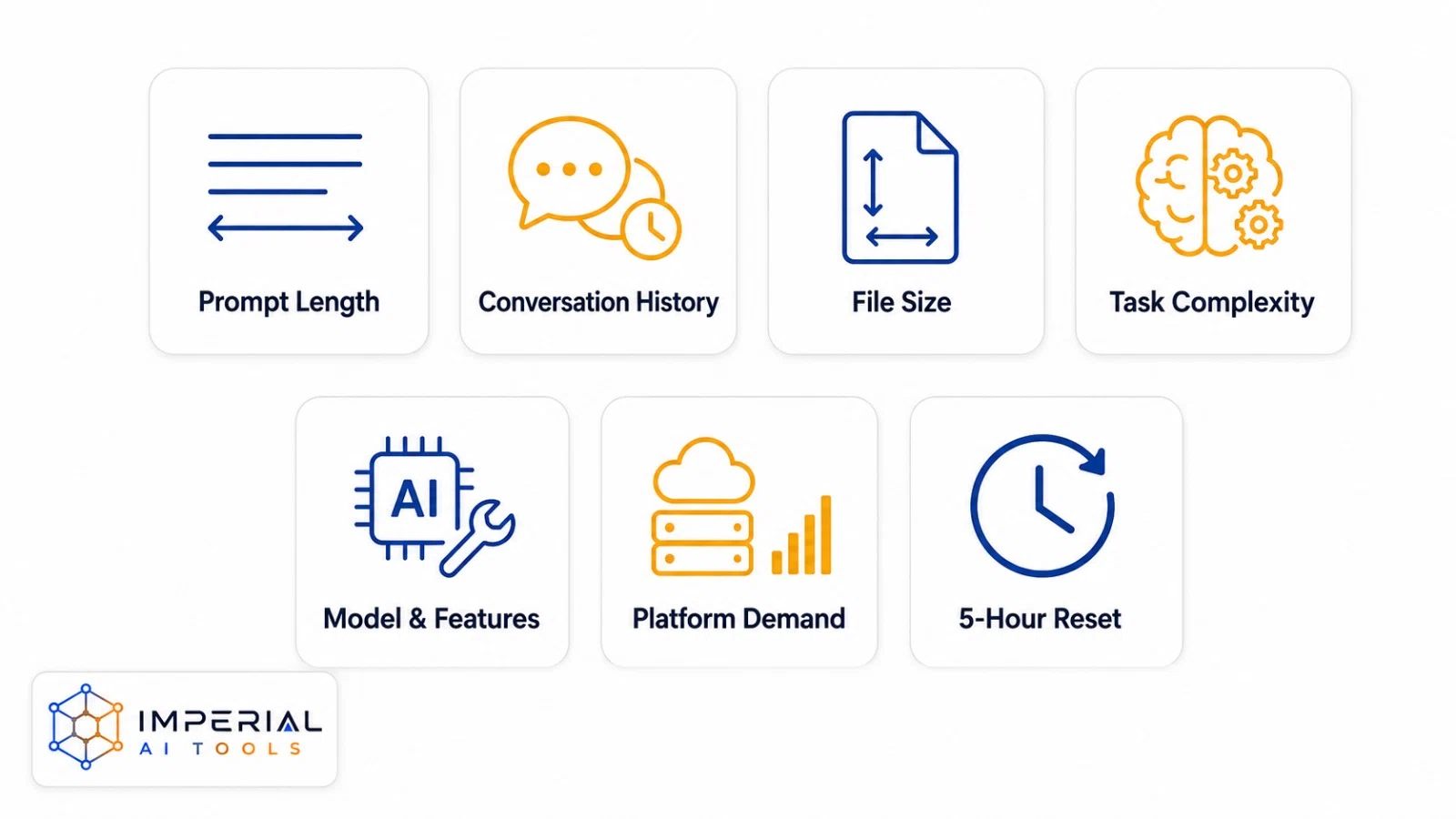
Claude doesn’t hand out one fixed number of free messages to every user. Your allowance shifts based on:
- Prompt and response length
- Conversation history
- File size
- Task complexity
- The feature or model you’re using
- Overall platform demand
Anthropic runs free-plan usage on a session-based limit that generally resets every five hours, though the exact number of messages available in each window can vary. When you hit the limit, Claude typically shows a notification with an expected reset time. At that point, your real options are to wait it out or move to a paid plan.
Skip proxies, extra accounts, shared logins, or modified apps that claim to bypass Anthropic’s limits they’re not worth the privacy and security risk.
Is There a Claude Free Trial in 2026?
Can I get a Claude free trial? Not on demand. As of October 2026, Anthropic’s pricing page lists a free plan at $0 and Pro at $20 per month, with no standard Claude AI Pro trial button. So if you ask “is there a free trial for Claude Pro?”, the honest answer is no public trial. There are two real ways to get a free Claude Pro trial.
How to get one for free:
- Guest pass: An eligible Pro or Max subscriber can share a link that gives you seven days of Pro, including Claude Code and Cowork. You must be new to paid plans. Passes are limited and first come, first served.
- Promotions: Anthropic sometimes runs offers for first-time paid users. Go to Settings > Billing > Upgrade plan, pick Pro, and read the checkout summary before you confirm. If it shows only the regular price, no Claude trial applies to your account.
Watch the card step. A guest pass asks for payment details and converts to a paid Pro plan unless you cancel. Set a reminder at least 24 hours before it renews.
Be careful with scams. Sites that promise a “free Claude Pro trial” or “Claude for free” in exchange for a login or payment are not Anthropic offers. There is no Claude AI free trial outside claude.ai.
Is Claude Free Unlimited?
No. Claude’s free plan is not unlimited. It is a real, permanent free plan, but it has a usage cap that resets after a waiting period. Any site that promises “unlimited free Claude” or “Claude Pro free forever” is either a scam, a shared account, or a third-party tool with its own limits.
Be cautious of:
- Sites promising “Claude Pro free forever”
- Shared or stolen accounts
- Unofficial modified apps
- Free API keys from unknown sources
- Proxy-based limit bypasses
Some third-party services do offer limited access to certain Claude models, but their privacy practices, features, and limits can differ significantly from Anthropic’s own product. Always verify any “free promo” claim through Anthropic’s official channels before trusting it.
Claude Free vs. Paid Plans and Pricing
| Plan | Listed price | Best for |
|---|---|---|
| Free | $0 | Occasional and light use |
| Pro | $20/month or $200/year | Regular individual use |
| Max 5x | $100/month | Frequent professional use |
| Max 20x | $200/month | Intensive daily use |
Pro adds more usage headroom plus extra features; Max scales that up significantly for heavy users. Regional pricing, mobile app charges, and taxes can shift these numbers, and Anthropic changes plans periodically always confirm current pricing before subscribing.
Stay with Free if:
- You use Claude occasionally
- Usage resets don’t interrupt important work
- The included features already meet your needs
Consider Pro if:
- You keep hitting the free limit
- You use Claude for regular professional work
- You need paid-only features like Claude Code, Cowork, Research, extra models, or higher usage caps
If you’re weighing Claude against other assistants before you commit to a plan, our claude vs chatgpt comparison breaks down where each one actually wins. Already on a paid plan and want to drop to free? Here is how to stop your claude billing.
Is Claude Free Safe? Privacy Tips Before You Upload Files

- Don’t upload passwords, API keys, banking details, or private client data.
- Strip names and identifying info from sensitive documents.
- Review Claude’s privacy and data controls before uploading anything sensitive.
- Verify statistics, quotes, dates, and current events independently.
- Test generated code before running it in a live environment.
- Review AI-generated content before publishing it anywhere.
- Don’t treat Claude’s output as professional medical, legal, or financial advice.
Other Free Ways to Use Claude (and Free Alternatives)
Claude’s free plan is genuinely useful for writing, research, coding, and document analysis, but another assistant might fit your workflow or usage limits better. Our complete claude guide covers its models and features in more depth. You can also compare claude vs chatgpt or browse the best chatgpt alternatives to see how gemini, perplexity, and copilot stack up.
Should You Stay on Claude Free or Upgrade to Pro?
Stay on free if you chat a few times a week and a reset wait does not block your work. Upgrade if you hit the limit more than once a week, need Claude Code, or use Claude for paid work. Not sure? Use the free plan for one week and count how many times you get stopped. Once your account is set up, you can use it for writing, research, summaries, coding, web search, file analysis, and everyday questions. Just know it isn’t unlimited your available usage moves depending on conversation length, file size, task complexity, selected features, and overall demand.
Writing focused prompts, uploading only what’s necessary, and starting fresh chats for new tasks all help your allowance stretch further. Start with Claude Free, and only upgrade if the limits keep interrupting real work or you need a paid-only feature.
Claude Free Frequently Asked Questions
Can I use Claude without creating an account?
The official Claude service generally requires an account to chat. Unofficial or third-party services may offer limited access without one, but their privacy policies and restrictions can differ a lot from Anthropic’s own.
Can students use Claude for free?
Yes, students can use Claude’s standard free plan anywhere it’s available. Some eligible institutions also offer separate educational programs with added benefits.
Is Claude Code included in the free plan?
The free chat experience can already generate and explain code. The standalone Claude Code product, however, is currently bundled with eligible paid plans only.
Is Claude Free? What You Get on the Free Plan
Yes, Claude has a free plan. You can sign up at Claude.ai without a credit card and chat, write, code and upload files. The free plan has a usage limit that resets after a waiting period, so it is free but not unlimited. Pro and Max plans add more usage.
Why does Claude say I reached my limit on the free plan?
Free usage is capped. Long chats, big files and busy periods use it up faster. Start a new chat for new tasks and wait for the reset time shown in the message.