This Claude guide shows you how to use Claude AI, Anthropic’s assistant that writes, reads files, codes, and searches the web. Go to claude.ai, sign up free, and chat with the default Sonnet 5.5 model. Pay for Pro ($20 a month) only when you need Claude Code, Cowork, or Opus 5.5. Below you get sign-up steps, the four current models, real prices, prompt rules, Claude Code setup, tool use, and fixes for common problems. Rebuilt October 14, 2026, so model names and prices are current.
One quick disambiguation before we start, because Google mixes these up constantly: this guide covers Claude AI, the assistant made by Anthropic not Claude Monet, the French Impressionist painter. If you came here looking for Claude Monet artwork, you’re in the wrong (but understandable) place. Everyone else, let’s get into it.
Quick Answer
This Claude guide in short: open claude.ai, sign up free, and chat with the default Sonnet model. Upgrade to Pro at $20 a month for Claude Code, Cowork, and Opus 5.5. Use Haiku 5.5 for cheap, fast jobs. Save Fable 5.1 for the hardest work. Write specific prompts and start a new chat when answers drift.
Key takeaways
- Four public models matter now: Fable 5.1, Opus 5.5, Sonnet 5.5, and Haiku 5.5. Mythos 5.1 is limited to trusted organizations.
- Sonnet 5.5 is the best default: $2 input and $10 output per million tokens, with a 1M-token context window.
- Chat and Cowork became one experience on September 16, 2026. Cowork now runs on Mac, Windows, web, and mobile.
- Claude Code needs a paid plan. The free claude.ai plan does not include it.
By the end, you can open Claude, pick the right model, write prompts that work, and set up Claude Code or Cowork. Setup takes about 10 minutes and costs $0 on the free plan. Paid plans start at $20 a month.
What Is Claude AI? (And Who Owns It)

Claude is a family of AI models and an assistant built by Anthropic, a US-based AI safety company founded in 2021. For specialised legal tasks, AI legal research and contract review with CoCounsel provides an alternative built around legal databases, document review and law-firm workflows.
At its core, Claude is a large language model: you type (or speak, using Claude’s chat voice feature on mobile), and it responds. But calling it a chatbot undersells what it does in 2026. Claude can write and debug code, analyze documents hundreds of pages long, search the web, generate spreadsheets and presentations, and through tools like Claude Code and Cowork work autonomously on your files for minutes or hours at a time.
You can access Claude through the web at claude.ai, the Claude mac desktop app (and Windows equivalent), iOS and Android apps, and the Claude API via the developer console. For anyone asking “can I use Claude for free?” yes, and we’ll cover exactly what the free tier includes shortly. If you are comparing assistants, Claude features in our list of free grok alternatives for writing. Claude is also one of our top free perplexity alternatives for reasoning and long documents.
“I’ve followed tech for 25 years, and I’ve never felt a larger gap between the ~1 million people using Codex/Claude and the rest of humanity.”
Claude Models Explained: Fable, Opus, Sonnet and Haiku

Anthropic ships a new model about every month. The table lists the current public lineup with dates and API prices per million tokens. A token is a small chunk of text, about three quarters of a word.
| Model | Released | Best for | API price (input / output) |
|---|---|---|---|
| Claude Haiku 5.5 | Oct 7, 2026 | Fast, high-volume jobs and subagents | $0.10 / $0.50 (prompts up to 100K tokens) |
| Claude Sonnet 5.5 | Sep 28, 2026 | Daily writing, coding, and file work | $2 / $10 |
| Claude Opus 5.5 | Sep 22, 2026 | Hard tasks that need judgment | $4 / $20 |
| Claude Fable 5.1 | Sep 1, 2026 | Hardest long-running agent work | $10 / $50 |
| Claude Mythos 5.1 | Sep 1, 2026 | Trusted organizations only | Not public |
Sources: Anthropic Haiku 5.5 page, Digit (Sep 29, 2026), and Anthropic release notes. Haiku 5.5 and Sonnet 5.5 both offer a 1M-token context window. Haiku 5.5 prompts above 100K tokens cost $0.50 input and $2.50 output.
Which Claude Model Should I Use?
- Start with Sonnet 5.5. It covers most work at a low price.
- Move to Opus 5.5 when answers lack depth, such as system design or tricky analysis.
- Pick Haiku 5.5 for classification, summaries, and quick replies in bulk.
- Try Fable 5.1 only after Opus 5.5 at high effort falls short. Third-party reports say Pro users pay for Fable through extra usage credits, so check your plan first.
What Changed Since Mid-2026
- May 28: Opus 4.8.
- June 9: Fable 5 and Mythos 5.
- June 30: Sonnet 5. July 24: Opus 5.
- September 1: Fable 5.1 and Mythos 5.1.
- September 22: Opus 5.5. September 28: Sonnet 5.5.
- October 7: Haiku 5.5, the first Haiku with an adjustable effort setting.
Developer note: Code written for Haiku 4.5 can fail with 400 errors on Haiku 5.5. The causes are manual budget_tokens, temperature, top_p, top_k, and assistant prefill settings.
Get Started With Claude: How to Use Claude AI in 5 Steps

Use these steps to get started with Claude. Time: about 10 minutes. Cost: $0.
- Open Claude and sign up. Go to claude.ai or install the Mac, Windows, iOS, or Android app. Sign up with email or Google. Your chats sync across devices.
- Confirm you are an adult. Claude is for users aged 18 and older. Verify your email and finish any identity prompts.
- Pick a model. Open the model menu. Stay on Sonnet for now. Paid plans add Opus.
- Write your first prompt. State the task, add context, and name the format. Example: “Summarize this report in five bullets for a busy manager.”
- Add files, search, and Projects. Upload a PDF, switch on web search, and save repeat work in a Project so Claude keeps your instructions.
- Readers developing personal AI-assisted book workflows can also investigate Hardcover’s open GraphQL API and reading-library integrations, which enable compatible community-built tools to access book information and reading records.
- open GraphQL API and reading-library integrations
The free plan has daily limits that reset after a few hours. A heavy session can hit them fast, so keep each chat on one topic.
What Can Claude Do? Chat, Cowork, Docs, Design and Claude Code
Older guides describe three separate Claudes. That changed on September 16, 2026, when Anthropic combined Cowork and chat into one experience. Here is how the pieces fit now.
- Chat: ask questions, write, and analyze files. Free.
- Cowork: give Claude a goal and a folder, then let it finish multi-step tasks. Paid plans.
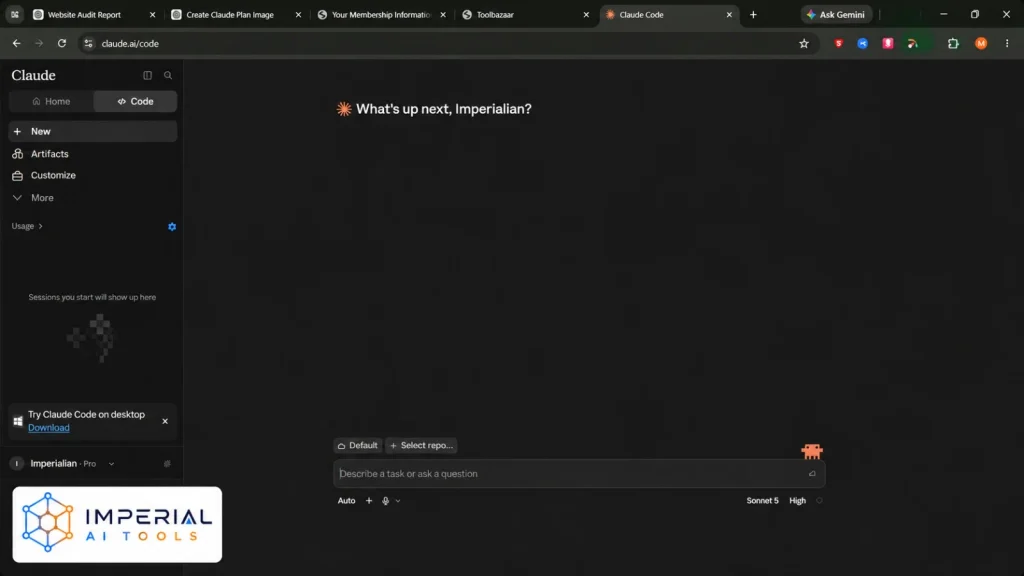
- Claude Code: a coding agent for the terminal, desktop app, and code editors. Paid plans.
- Docs, Slides, and Design: left beta on October 8, 2026 and work on every plan, including Free. Dashboards and Motion are still beta.
The older standalone claude.ai/design site stays online until December 14, 2026, according to Anthropic’s release notes.
How to Start With Claude Cowork
For a broader understanding of what happens when AI systems operate autonomously, AI Digest’s free AI Village research project documents agents from multiple model providers attempting real tasks and responding to setbacks. It reached web and mobile on paid plans on August 18, and gained a built-in browser on August 26.
- Update the app. Install the latest Claude desktop app for Mac or Windows, or open Claude on the web.
- Choose a folder. Pick one small folder with a copy of your files, not your only copy.
- Describe the finished result. Example: “Sort these 40 invoices by month and build a summary sheet.”
- Read the plan. Claude shows its steps first. Fix anything wrong before it runs.
- Check the output. Open the new files and spot-check numbers against the originals.
Pro tip: Add an “about me” file and a “templates” folder. Claude reads them for context, so results match your style.
How Much Does Claude Cost? Plans and Pricing (October 2026)
| Plan | Price | What you get |
|---|---|---|
| Free | $0 | Chat, web search, file uploads, Projects, daily limits. No Claude Code. |
| Pro | $20/month ($17 billed yearly) | Claude Code, Cowork, Opus models, higher limits. |
| Max 5x / Max 20x | $100 / $200 per month | About 5x or 20x Pro usage. Monthly API credit of $100 or $200 since October 7. |
| Team Standard / Premium | $25 / $125 per seat | Admin controls. Premium adds Claude Code. Pooled API credit up to $500. |
| Enterprise | Custom | Single sign-on, audit logs, compliance tools. |
Plan prices come from a June 2026 snapshot plus Anthropic’s October release notes. Confirm on the official pricing page before you pay.
Is Claude Free? What the Free Plan Includes
Yes. The free plan is enough to learn Claude and handle light work. Our guide on how to use Claude for free covers the limits and workarounds.
Claude API Pricing
The API charges per token, so use the model table above. Batch jobs can cost up to 50% less. Sonnet 5.5 cache reads dropped from $0.20 to $0.10 per million tokens on October 7. To stop paying, follow our steps to cancel a Claude subscription.
How to Install Claude Code on Mac, Windows and Linux
Claude Code needs a Pro, Max, Team, Enterprise, or Console account. It runs on macOS 13+, Windows 10 1809+, Ubuntu 20.04+, and Debian 10+, with 4 GB of RAM. See other AI code assistants if you want to compare.
- Install. On macOS, Linux, or WSL, run the first command. On Windows PowerShell, run the second.
curl -fsSL https://claude.ai/install.sh | bash irm https://claude.ai/install.ps1 | iex - Check it. Open a new terminal and run
claude --version. A version number means success. - Log in. Go to your project folder, run
claude, and follow the browser prompts.
The npm route also works: npm install -g @anthropic-ai/claude-code (Node.js 22 or later). Never use sudo with it. Native installs update themselves. Run claude doctor if something fails. Full details are in the official setup docs.
Claude Tool Use Explained: Skills, MCP and the API Loop
Claude tool use means Claude can call a function instead of only writing text, decides when a tool helps, then returns a structured request. Something else runs it.
Client tools and server tools
- Client tools run in your app. You write them, or use Anthropic’s bash, text editor, memory, and computer use tools.
- Server tools run on Anthropic’s systems. Web search, web fetch, and code execution are examples.
The five-step loop
- You send a message and a list of tools.
- Claude replies with a tool_use block.
- Your code runs the tool.
- You send back a tool_result.
- Claude uses it to answer, or calls another tool.
Tool definitions count as input tokens, and some server tools add fees, such as per-search charges. The official tool use docs explain each field. Developers monitoring the cost of repeated agent calls can explore Vynaris AI’s token usage and API cost tracking, which provides individual request receipts and an exportable spending ledger.
Skills, Projects, and MCP in plain words
- Projects store files and instructions for one topic.
- Skills are saved instruction folders Claude loads for a repeat job.
- MCP is a standard plug that connects Claude to apps like Google Drive or Gmail.
How to Write Better Claude Prompts: 6 Simple Rules
- Be specific. Name the audience, length, and format.
- Give an example. Paste one good sample and say “match this style.”
- Say what you want, not what you don’t. “Write in short sentences” beats “don’t be wordy.”
- Start small. Ask for an outline first, then expand each part.
- Let Claude ask questions. Add: “Ask me what you need before you start.”
- Restart when it drifts. Long chats lose focus. Open a new chat and paste a short summary.
Before and after: “Write about SEO” gives a vague essay. “Write a 300-word beginner explainer on on-page SEO for shop owners, with three bullet tips” gives a usable draft.
Claude Guest Pass: How to Get One (and Scams to Avoid)
A Claude guest pass gives a new user a free week of Claude Code. Anthropic does not publish full rules, so the details below come from the Claude Code docs and user reports from September 2026.
- Type
/passesin Claude Code. The command only appears if your account is eligible. - Each claude.ai/referral link works for one person. Users report three passes per account.
- The new user must be new to paid plans. Reports say the sender earns $10 of extra usage if the friend subscribes.
Avoid this: Sites that “generate” a Claude referral code or sell passes. Real links come only from the /passes command, and shared links are often claimed within minutes.
3 Common Claude Mistakes to Avoid
Mistake 1: Using the biggest model for everything. Opus and Fable use your limits faster. Run routine work on Sonnet 5.5 or Haiku 5.5.
Mistake 2: Trusting old guides on models and prices. Model names and plan rules changed several times this year. Check the date on any guide, including this one.
Mistake 3: Pasting secrets into chats. Never share passwords or private client data. Review the privacy settings on Free and Pro plans, since defaults can change.
Troubleshooting: Is Claude Down, Slow, Limited or Banned?
- Is Claude down? Check status.claude.com. If it shows an incident, wait.
- Hit your usage limit? Wait for the reset, switch to Sonnet or Haiku, or open a shorter chat.
- Claude is slow? Long chats and big files slow replies. Start a fresh chat and upload only the pages you need.
- Account locked or banned? Read the email from Anthropic, then appeal through the support page.
- Bad answer? Say exactly what is wrong, paste the part you want fixed, and ask Claude to explain its reasoning.
Our Take: Where to Start With Claude
For a beginner, the fastest path in this Claude guide is simple: sign up free, stay on Sonnet, and practice the six prompt rules for a week. Pay for Pro only when you hit limits or need Claude Code or Cowork. One limit: Claude has no built-in image generation, so pair it with another tool for visuals.
Once you know the basics, see how claude fits next to other tools before you pay for a plan. Our claude vs chatgpt comparison shows where each one wins, the chatgpt guide covers the same setup steps for OpenAI’s assistant, and our list of chatgpt alternatives ranks other options if neither fits your work or budget.
Frequently Asked Questions
Why is AI called Claude?
Anthropic has not given a long public explanation. The name is widely reported as a tribute to Claude Shannon, the mathematician who founded information theory. Treat that as a common explanation, not an official statement.
Why are people moving from ChatGPT to Claude?
Users often name three reasons: natural writing, strong coding with Claude Code, and good handling of long documents. Others like Cowork for file tasks. ChatGPT still leads on built-in image generation.
Why are people getting banned on Claude?
Common causes are breaking the usage policy, signs that an account is under 18, suspicious sign-in activity, payment problems, or sharing and reselling access. Read the email Anthropic sends. If you think the ban is wrong, send an appeal through Anthropic’s support page and keep your account details ready.