Higgsfield AI is a browser studio that puts many video and image models behind one credit balance. To make a clip: pick a model, write a specific prompt, read the credit cost on the Generate button, then download from Assets. Subscription credits reset every billing cycle and do not roll over. Free-account videos carry a watermark. This Higgsfield AI guide walks through each step, plus prompts, camera moves, plans and pricing, rights and fixes. Facts come from Higgsfield’s Help Center, Terms of Use (updated October 23, 2026) and changelog.
Quick Answer
Higgsfield AI is a browser studio that puts many third-party video and image models, plus its own Soul image models and Cinema Studio camera tools, behind one credit balance. To get a usable clip: pick the goal, choose a model, write a specific prompt, read the credit cost shown before you click Generate, then download from Assets. Subscription credits reset every billing cycle and do not roll over. Free-account output carries a visible watermark.
Key takeaways
- Draft on a cheaper model, finish on the better one. Read the credit cost before you click Generate.
- Subscription credits do not roll over. Credit packs last 90 days.
- Free accounts get no credits, a small set of models and a watermark.
What Is Higgsfield AI?

Higgsfield AI is a web-based creative studio that lets you make AI video and images with many third-party models and its own Soul image models, using one credit balance. It also adds camera control (Cinema Studio), character tools (Soul ID) and ad tools (Marketing Studio). Higgsfield is a creative suite run by Higgsfield Inc. in San Francisco. It does two things:
- Hosts models from other companies. For video: Seedance, Kling, Veo, Wan, Grok Imagine and Gemini Omni Flash. For images: Nano Banana, Flux 2, Seedream, GPT Image and Ideogram.
- Adds its own tools. These include the Soul image models and Soul ID, Cinema Studio, Marketing Studio, Canvas, Lipsync Studio and the Supercomputer agent.
What this means for you: the quality of a clip depends mostly on the model you pick, and each model spends credits at a different rate.
What’s New in Higgsfield AI Video in 2026 (October Update)
Higgsfield’s changelog shows frequent product updates. These are the 2026 features and updates a beginner should know, as of October 24, 2026:
- Kling 4.0 arrived. Higgsfield’s changelog (October 21) says Kling’s new video model is live, with a launch discount shown on the Generate button. A comparison post from October 19 said it was not there yet, so what you see can differ by account.
- Cinema Studio 4.0 is the default version. It runs on Seedance 2.5, takes up to 50 references and makes clips up to 30 seconds. See the version table below.
- The video line-up grew. Seedance 2.5 and 2.0, Kling 3.0, Veo 3.1, Wan 2.6, Grok Imagine 1.5 and Gemini Omni Flash are listed. Wan 3.0 had a free week for subscribers from October 13.
- Longer films through agents. OpenAI says (October 13) that Higgsfield users can now make videos longer than 10 minutes with an agent workflow on GPT-6 Astra, up from about a minute. That is an agent pipeline, not one generation.
- AI Influencer builder. A character builder for virtual personas. Higgsfield lists 5 free generations for every user (as of October 3).
- Terms of Use updated again on October 23. See the rights section below.
- Sora is gone from the wider market. OpenAI closed the consumer Sora app on April 26, 2026 and its API on September 24, 2026 (reported by several outlets citing OpenAI’s help center). Higgsfield’s Help Center still lists Sora 2 pages, so confirm in your own account before you plan around it.
Higgsfield AI Products at a Glance
These are the main Higgsfield AI products listed in its menu and Help Center as of October 24, 2026. The table in the next section shows which one to open for each job.
- Image and Video: generate with Higgsfield’s Soul models and third-party models.
- Cinema Studio: directed shots with camera and lens control.
- Soul ID and AI Influencer: keep one character across images and video.
- Marketing Studio: ads from product photos or links.
- Lipsync Studio and Audio: voice, lip sync and translation.
- Canvas, Popcorn and Genjutsu: planning frames and editing existing footage.
- Supercomputer: an agent that plans steps and picks models for you.
- Apps and Effects, Upscale, Inpaint: one-click effects and fixes.
- API, MCP and CLI: for developers and assistants.
Which Higgsfield Tool Should You Use?

| You want to… | Open this | Why |
|---|---|---|
| Make one realistic clip from text or an image | Video, with seedance | The Help Center points to Seedance for realistic human motion and calls it the most forgiving video model for beginners. |
| Make longer or multi-shot clips | Video, with Kling | Described for longer clips, multi-shot continuity and physically coherent motion. |
| Control the exact first and last frame | Video, with Wan | Wan is listed for strong first and last frame control. |
| Direct a scene with lenses and camera moves | Cinema Studio | Structured control of optics, motion, genre and lighting. |
| Keep one real person’s face across images | Soul ID, with Soul 2.0 or Soul Cinema | Trained once, reused across generations. |
| Invent a character from scratch | AI Influencer Studio or Soul Cast | Soul ID locks a real person. Build an invented character first, then train a Soul ID on its portraits if you need a face lock. |
| Turn a product photo or URL into an ad | Marketing Studio | Template-based ad production from product images or links. |
| Plan storyboard frames | Popcorn | Built for connected frames and edits across them. |
| Add voice, lip sync or translation | Lipsync Studio and Audio | Higgsfield lists ElevenLabs’ Eleven v4 for expressive voices (see our elevenlabs review) and a Seed Speech option for multilingual work. |
| Change a clip you already have | Edit Video in Cinema Studio 4.0, or Genjutsu | Regional edits, object swaps and motion transfer without regenerating the whole shot. |
| Hand the whole job to an agent | Supercomputer | You describe the result; it plans steps and picks models. It always spends credits. |
How to Create Your First Higgsfield Video, Step by Step
Example job: an 8-second vertical teaser for a product on a table. The same steps work for any short clip.
- Write the result in one line. “9:16, 8 seconds, a steel water bottle on a wooden table, slow move toward the label.” If you cannot say it in one line, the prompt will wander.
- Choose a clean starting image. Higgsfield’s own tutorial advises a sharp, well-lit image with a clear subject and a simple background. Do not crop hands, faces or product labels.
- Open Video and pick a cheaper model for drafts. Higgsfield’s October 19 comparison post lists Kling 3.0 at 10 credits for a 5-second 720p clip.
- Describe the motion only. The picture already holds the subject, setting and light. Say what moves and how the camera behaves. Use one main camera move.
- Read the credit cost on the Generate button. Higgsfield shows the cost before you confirm. Keep batch size at 1 for drafts, because each extra output is charged separately.
- Generate two drafts and change one thing between them. Change only the camera move, or only the lighting. Then you know what caused the difference.
- Re-run the winner on your final setting. For example Kling 3.0 at 1080p, listed at 12.5 credits for 5 seconds, or Seedance when human motion matters most.
- Download from Assets and check the file. Look for a watermark, warped text on the label and odd hands. Then follow the platform checklist below before you post.
Testing note (try this yourself): Before you pay for a month, run the same 5-second prompt on two models. Write down the credits shown, the number of tries it took to get a keeper, and which one you would actually publish. That tells you more than any model ranking.
Idea-to-publishable-video checklist
- Script: one sentence per shot. Keep each clip short.
- Prompt: subject, action, setting, style, then camera and mood for video.
- Plan check: does your plan include the model you want? Entry plans have core models; higher plans unlock all of them.
- Credit check: read the cost on the Generate button and compare it to your balance and renewal date.
- Generate: draft cheap, finish on the better model.
- Review: faces, hands, product labels, text, motion, audio.
- Download: from Assets, on a paid plan if you need a clean file.
- Platform rules: add the AI label where the platform asks for it (see below).
How to Write Better Higgsfield AI Prompts
Higgsfield’s Help Center says the biggest improvement is simple: be specific. A vague prompt leaves the model to guess, and it guesses differently every time. Think in layers and fill the ones that matter.
| Layer | What to say | Example |
|---|---|---|
| Subject | Who or what is in the frame | A matte green steel water bottle |
| Details | Appearance, clothing, expression | Condensation on the surface, label facing the camera |
| Environment | Where it happens | Wooden table beside a window |
| Style | Look and treatment | Clean product commercial, soft natural light |
| Camera (video) | Lens, angle, movement | Slow dolly in, shallow depth of field |
| Mood (video) | Feeling and pace | Calm, premium, unhurried |
| Limits | What must not change | Keep the label text unchanged, no extra objects |
Text-to-video vs image-to-video prompts
- Text-to-video: lead with the subject and its main movement, then background, shot size, lens, light and camera move.
- Image-to-video: the image already shows what things look like. Your prompt should describe what happens: action, camera movement, timing and mood. Name what must stay the same (face, outfit, product, background).
- Start and end frames: some tools let you set both. The start frame locks the look; an end frame locks a clean finish for a cut, a thumbnail or a call to action.
- Language: write in English for the most predictable results. Higgsfield notes that Chinese-developed models such as Seedance and Kling sometimes respond better to Chinese for nuanced motion.
Camera-motion prompt examples
| Move | Prompt wording | Use it for |
|---|---|---|
| Dolly in | “Slow dolly in toward the subject’s face.” | Drama, focus on a product or reaction |
| Orbit | “Camera orbits slowly around the car, 90 degrees.” | Product reveals |
| Tracking | “Smooth tracking shot following the runner from the side.” | Action and travel scenes |
| Pan or tilt | “Camera pans left across the skyline, then holds.” | Establishing shots |
| Crane / helicopter | “Crane up and back to reveal the whole valley.” | Big reveals (Helicopter Shot is a listed Cinema Studio 4.0 move) |
| Handheld | “Handheld, slight shake, close on her face.” | Documentary and UGC feel |
| Static | “Locked-off camera, only the subject moves.” | When the camera keeps ruining the shot |
Tip: Use one primary camera move per short clip and describe subject motion separately from camera motion. Say what you want, not a long list of what you do not want. A few key exclusions such as “no readable text” or “no plastic skin” can help on detailed shots. Change one thing at a time between tries.
Higgsfield Cinema Studio: Camera and Shot Control (Versions 2.5 to 4.0)

Cinema Studio is the tool for directed shots. It loads version 4.0 by default and lets you switch back to older versions.
| Version | Best for | Key points |
|---|---|---|
| 2.5 | AI actors plus color grading | Up to 3 Soul Cast characters, built-in color grading. No video uploads. |
| 3.0 | Realism and physics-aware motion | Up to 9 references, 7 genres, native audio. Video uploads up to 15 seconds. |
| 3.5 | AI-assisted directing and teamwork | AI Director (Claude Chat) that drafts shots, Elements system, shared projects. Video uploads up to 15 seconds. |
| 4.0 | Deepest control, longest clips | Runs on Seedance 2.5. Director’s Panel, up to 50 references, clips up to 30 seconds, extend forward or backward, Edit Video. Video uploads up to 30 seconds. |
- Director’s Panel (4.0): genre, era, editing tempo, camera type, lens, aperture, color palette and lighting in one place.
- Native audio: the current versions generate sound effects, speech and music in the same pass as the video.
- AI Director: it fills the prompt box and settings for you to review. It never presses Generate for you.
- “May contain protected content”: this block means the system found a real face or protected IP. Remove it and try again.
Higgsfield Character Consistency: Soul ID and Elements
- Real person: train a Soul ID. Open Soul, choose Train new character, name it and upload 20 or more clear photos. Training takes a few minutes. It works across Soul 2.0 and Soul Cinema.
- Invented character: build it in AI Influencer Studio (or Soul Cast in Cinema Studio), generate a batch of portraits, then train a Soul ID on 20 or more of them if you need a face lock.
- Video: save the character as an Element and reference it in your prompts. Soul ID characters also appear in Elements.
- Two or more characters in one scene: use Elements. One Soul ID holds one person.
- Prompt wording: to restyle without losing identity, say “keep the exact same man, same face, same pose” and then change only the wardrobe or the setting.
Higgsfield Templates, Presets and Apps
You do not have to build every shot from a blank prompt. Higgsfield offers three kinds of shortcuts:
- Apps and Effects: one-click tools and effects, found in the main menu next to Image and Video.
- Higgsfield DOP presets: VFX and camera-move presets, for when the camera work is the point of the shot.
- Marketing Studio templates: Higgsfield says it has 1,500+ templates in six categories (Product Shots, Ads, Marketplace, Posters, UGC Videos and Motion).
How to use them well: start from a preset, generate once, then edit the prompt. You can also open a published Community project to read its prompt and settings, then use the Recreate button to copy it into your own workspace.
How to Edit, Extend and Upscale Higgsfield Videos
- Edit Video (Cinema Studio 4.0): change an object or a face without regenerating the whole clip.
- Extend: continue an uploaded video of up to 30 seconds forward or backward in Cinema Studio 4.0.
- Chain clips by hand: use the last frame of one clip as the start image of the next, then join them in an editor.
- Genjutsu: a video-to-video tool for changing footage you already have, including motion transfer and object swaps (per Higgsfield’s blog).
- Upscale and Inpaint: separate tools in the menu for sharper images and local fixes.
- Audio prep: if you upload a voice recording, clean it first. A tool such as LALAL.AI can remove noise or split vocals from music.
Higgsfield AI Pricing and Plans (Snapshot)
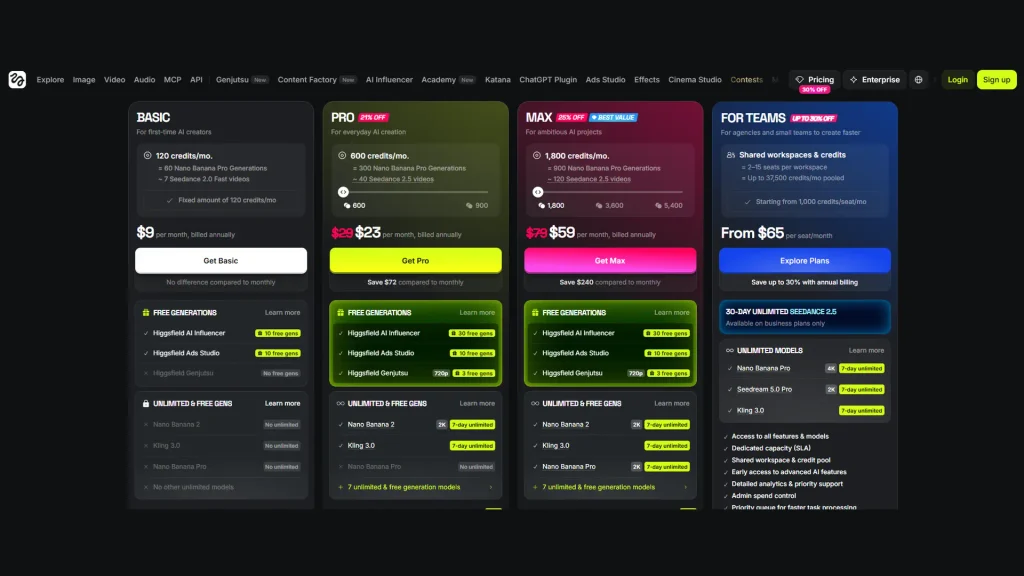
Here are Higgsfield’s plans as listed in its own October 19, 2026 post and one third-party tracker. Older trackers show different prices (for example Starter at $19 and Plus at $59), so confirm on the live pricing page before you pay.
| Plan | Monthly price | Credits per month | Notes |
|---|---|---|---|
| Free | $0 | None | Small set of models. Visible watermark. |
| Starter | $15 | About 200 | Core models. |
| Plus | $49 (about $39 a month billed yearly) | About 1,000 | More models and Unlimited options. |
| Ultra | $129 (about $99 a month billed yearly) | About 3,000 | Every model. |
Subscription credits do not roll over (see the next section). Credit packs are extra and last 90 days.
Is Higgsfield AI free?
Partly. You can sign up and generate without paying, but a free account gets no credits, a small set of models and a visible watermark on every generation.
Higgsfield Credits: How They Work, Expire and Roll Over
- Credits pay for generations. The cost depends on the model, resolution, duration, audio and number of outputs. Higgsfield shows the cost before you confirm.
- Spending order: subscription credits first, then Credit Pack credits, then promo credits, then Auto-Refill credits.
- Batch size multiplies cost. If you set 2, 3 or 4 outputs, each one is charged separately.
- Failed generations are refunded automatically, usually within minutes. Check Manage Account, then Usage, where every charge and refund is logged.
- Credits cannot be used without an active subscription.
Do Higgsfield credits roll over?
No, not subscription credits. On monthly plans they reset with each paid renewal. On annual plans they reset every 30 days. The Terms of Use say the same: unused Subscription Credits expire at the end of the billing period.
- Credit Packs and Auto-Refill credits are valid for 90 days from purchase. Packs come in sizes from 100 up to 4,000 credits, plus custom amounts.
- Promo credits expire on the date shown when they are added.
- If you cancel: the Terms say unused Credits expire on account cancellation. One version of the Help Center says pack credits keep their 90-day timer instead. Spend them before you cancel, and do not rely on the softer reading.
Credit budget example
Goal: 6 finished 10-second 1080p clips on a 1,000-credit budget, using Kling 3.0.
| Step | How it is worked out | Credits |
|---|---|---|
| Drafts | 6 clips × 2 drafts × 10 credits (5 s, 720p) | 120 |
| Finals, good case | 6 clips × 2 tries × 25 credits (10 s, 1080p) | 300 |
| Total, good case | 120 + 300 | 420 (580 left) |
| Finals, hard case | 6 clips × 4 tries × 25 credits | 600 |
| Total, hard case | 120 + 600 | 720 (280 left) |
Rates come from Higgsfield’s own October 19 comparison post: Kling 3.0 costs 10 credits for 5 seconds at 720p, 12.5 credits for 5 seconds at 1080p and 37.5 credits for 15 seconds at 1080p. The 25 credits for 10 seconds assumes the rate scales evenly. The number of tries is our assumption, not a Higgsfield figure. Always trust the number on the Generate button.
Ways to save credits
- Draft on a cheaper model and low resolution; finish on the better one.
- Keep batch size at 1 while you test.
- Save prompts and settings that worked.
- Check your renewal date in Manage Account so you spend credits before they reset.
- Remember that MCP, CLI, Canvas, Supercomputer and other automated tools always spend credits, even for models marked Unlimited on the website.
What “Unlimited” really covers
- It applies to specific models for a set period, not to the whole platform.
- Mid and top plans include a set of Unlimited models; you can also buy access to single models in the Unlimited Models Marketplace.
- Most included models have 365-day access. The newest flagships can have short windows, such as 7 days.
- It works only on higgsfield.ai.
- The Terms say Unlimited models run on a separate queue, and speed or concurrency can drop at busy times.
Higgsfield Commercial Use, Privacy and Platform Rules
This section summarizes Higgsfield’s Terms of Use (last updated October 23, 2026). It is not legal advice. For client work or big campaigns, read the current Terms yourself or ask a lawyer.
What the Terms say
- Ownership: Higgsfield says it does not claim ownership of your inputs or outputs and does not restrict your commercial use of outputs (Section 4.4). Your rights in exported outputs survive cancellation or deletion.
- Not tied to a plan in the Terms. The Help Center says there is no separate commercial license to buy. But some third-party price trackers report that the pricing page lists commercial use as not included on the Free plan, and free output is watermarked. Treat free-plan output as test material and check the live pricing page before client use.
- Not unique: outputs may be similar or identical to what other users get. Higgsfield does not guarantee originality.
- Third-party models: if a model comes from another company, that company’s usage policy also applies, and the stricter one wins (Section 8).
- “As is”: the Service and its outputs come without warranty, and you are responsible for clearing rights before you publish (Section 13).
Training, privacy and deletion
- Training: Higgsfield may use your content, inputs and outputs to train and improve its models. Deleting your content or account stops that use going forward, but content already used for training cannot be removed from trained models. Enterprise agreements exclude customer data from training (Sections 4.4 and 16.5).
- Marketing use: Higgsfield may use your content in its own marketing only if you made it public or you consent.
- Private by default: generations sit in your Assets library. Work becomes public when you publish it to Community. Check the setting on every feature, because the Terms warn that if you do not choose an access level, a feature may default to its most permissive setting (Section 3.2).
- Team workspaces: workspace admins can see and manage members’ content (Section 2.5).
- Deleted accounts: content is recoverable for 30 days, then permanently removed from active systems. Backups can hold copies a little longer.
- Background: in July 2026 users criticized an earlier version of the terms over a perpetual content license and training rights. Higgsfield revised them (summary posted July 25, effective August 27 for existing users). The training clause itself remains. If your clients forbid training use, ask about an enterprise agreement. For a comparison point, see how pixverse handles video privacy.
Troubleshooting and Higgsfield Support
| Problem | Likely cause | What to do |
|---|---|---|
| Character’s face changes | Weak or mixed references | Train a Soul ID, or reuse the same Element and start frame. |
| Camera motion looks unnatural | Conflicting movement instructions | Use one primary camera move. |
| Product label changes | Fine text is regenerated | Say “keep the label text unchanged” and use a sharp start image. |
| Hands or objects look distorted | Complex action in the scene | Simplify the action and composition. |
| Prompt partly ignored | Too many competing instructions | Shorten it and put the main action first. |
| Credits drain fast | Premium model, high settings, batch size above 1, retries | Draft cheap, batch 1, check Usage history. |
| Generation is slow or stuck | Queue full or heavy video model | Most jobs take 30 seconds to 10 minutes; heavy video can take 15 to 20 minutes. Hover the tile in Assets and select Cancel to get credits back. |
| “Rejected due to copyright” or “IP detected” | Brand, character or artist name, or a branded reference image | Describe the look instead of naming it, or swap the reference. Credits usually return automatically. |
| Flagged as NSFW by mistake | Swimwear, sports, medical images or vague wording | Rephrase and retry. Some providers run their own filters that Higgsfield cannot override. |
| “Something went wrong” | Skipped captcha or a provider error | Complete the captcha, refresh, retry later. |
| Download fails | Ad blocker, VPN add-on or privacy extension | Disable them for higgsfield.ai or use a private window. |
| Scenes do not match | Model, style or references changed | Reuse the same model, settings and Elements. |
Higgsfield support: how to reach it and what to send
- Where: the contact page at higgsfield.ai/contact, support@higgsfield.ai, the Help Center, and the Higgsfield Discord (feature requests go in #suggestions).
- When to write: a job stuck in the queue for more than 24 hours, stuck in processing for more than 10 hours, or credits not returned after a failed generation.
- What to send: the generation ID or job link from Assets, the model, any error text, your browser and operating system, and a screenshot.
- Refunds: the Terms allow a refund within 7 days of an initial purchase if no credits have been used. Renewals are not refundable. A service fee of up to 6% can apply. EEA and UK consumers have a 14-day withdrawal right.
- Cancel early: some users have publicly reported trouble cancelling or getting refunds (for example on Trustpilot and Discord, as summarized by third parties). We cannot judge individual cases, but the written refund rule is narrow. Cancel before renewal day, keep screenshots, and use the same email as the account.
Higgsfield vs Alternatives: Which One Should You Pick?
Short version: pick Higgsfield when you want many models, camera control and character tools under one credit balance. Pick a single-model tool when that one model is all you need. Prices below are snapshots from October 2026 or the date noted. Check each live pricing page. For a longer list, see our higgsfield alternatives page.
| Tool | Status and pricing snapshot | Pick it when… |
|---|---|---|
| Runway | Gen-4.5. Plans from about $12 a month on annual billing for 625 credits (one source lists $15 monthly). Gen-4.5 costs 12 credits per second. Monthly credits do not roll over (August 2026). | You want one studio built around its own model and editing tools. |
| Kling AI | Kling 4.0 makes 3–30 second clips up to 4K. Standard $10 a month, Pro $37 (Higgsfield’s October 2026 post). A free tier exists with a watermark and no commercial use. | Kling models are your main tool and you want the newest first. |
| Luma Dream Machine | Own Ray models plus hosted Veo 3.1, Kling 3.0 and Seedance 2.0. Plus $30 a month ($25 annual) for 10,000 credits. No permanent free tier on the pricing page (reported May–October 2026). | You want Luma’s own Ray models; Luma lists 16-bit HDR output for Ray 3.2. |
| Pika | Pika 2.5. Free tier of about 80 credits with watermark. Standard about $8 a month annual for 700 credits (June 2026). | Cheap, short social clips and effects. |
| Hailuo AI (MiniMax) | Hailuo 2.3 is the documented current model. Plans roughly $8–$10 a month, with daily free credits. Prices vary by region and promo. | You want fast, high-motion short clips on a low budget. |
| Google Veo 3.1 | Sold through Google AI plans: Plus $4.99, Pro $19.99 (1,000 Flow credits), Ultra $99.99 or $199.99. Free Flow users get 50 credits a day. Credits do not roll over. API is billed per second. | You already pay for Google AI or want Veo directly. |
| OpenAI Sora | Consumer app closed April 26, 2026. API closed September 24, 2026. | Not an option now. |
| Midjourney video (see how to make a video in midjourney) | Image-to-video only, 5-second clips, 480p by default, HD needs Fast time on Standard or above. Basic plan $10 a month. A video costs about 8 times an image job. | You already make images in Midjourney and want short motion. |
| Adobe Firefly | Standard $9.99 a month (2,000 credits, up to about 20 five-second videos). Premium $199.99 with unlimited use of the Firefly Video Model. Adobe says it is trained on licensed content. | Brand or legal teams want Adobe’s “commercially safe” training claim and Content Credentials. |
| Freepik (now Magnific) | Rebranded April 28, 2026. Plans from about $9 a month ($5.75 annual). Video clips cost roughly 200 to 3,000+ credits; unlimited use covers only selected image models. | You also need a stock library next to AI tools. |
| Krea | Free daily credits. Basic $9, Pro $35, Max $70 (August 2026). Premium video models need Pro or above. | You want image, video and upscaling in one canvas. |
| OpenArt | Starter $14, Plus $34, Pro $56, Wonder $240 a month (monthly billing). Users report its Director agent can overshoot credit estimates. | Character tools and many models matter most. |
| Pollo AI | Free plan plus three paid credit tiers, with an Agent mode. We did not verify current prices. | You want an all-in-one social video and avatar tool. Check live pricing first. |
Higgsfield vs Arcads
- Arcads is built around AI actors. You give it a script and it makes UGC-style ad videos from a library of 1,000+ actors, and counts credits per actor.
- Higgsfield is a wider suite. Marketing Studio turns a product URL or photos into ads, and Cinema Studio, Soul ID and many models cover b-roll, product shots and cinematic scenes.
- Pick Arcads if the whole job is talking-actor UGC ads written from scripts. Pick Higgsfield if you also need product shots, cinematic scenes or one balance for many models. Some teams use both.
- Be careful with head-to-head pages. Most are written by competitors or by Higgsfield itself. Our neutral view of a close rival is in creatify vs arcads.
Where to Start With Higgsfield AI
Higgsfield rewards a clear process: one-line goal, specific prompt, cheap drafts, one change at a time, then a careful final on the right model. Keep an eye on three things that change often: credit cost, model availability and the Terms. A practical first move is one short project: test a single camera move, note the credits it uses, and save the prompt that worked.
Higgsfield AI FAQ
Do Higgsfield credits roll over?
No. Subscription credits reset each billing cycle (every 30 days on annual plans) and expire. Credit Pack and Auto-Refill credits last 90 days from purchase. Unused credits can expire when you cancel, so spend them first.
How long can a Higgsfield video be?
It depends on the model. In Cinema Studio 4.0, clips run up to 30 seconds. A video you extend can also be up to 30 seconds (15 seconds in versions 3.0 and 3.5).
Do free Higgsfield videos have a watermark?
Yes. Every generation on a free account carries a visible watermark, and free accounts get no credits and a small set of models. Paid plans produce watermark-free new generations. Subscribing does not clean old files, so regenerate them.
Are my Higgsfield generations private?
They start private in your Assets library. They become public only when you publish them to Community. Higgsfield may still use your content to improve its models until you delete it, and workspace admins can see team members’ content. Check the visibility setting on each feature.
Why did my Higgsfield generation fail or get blocked?
Common causes are a full parallel-generation queue, the NSFW filter, the copyright or IP check, a provider error, or a skipped captcha. Credits for failed generations normally return automatically within minutes. Look in Manage Account, then Usage. If a job is stuck for more than 24 hours in the queue or 10 hours in processing, contact support with the generation ID.