This Suno AI guide shows you how to make a full song with vocals in about ten minutes. Suno is a browser-based ai music generator: you describe a song or paste lyrics, and it returns two versions for 10 credits. Two things changed this autumn. Suno switched to its v6 models on September 9, 2026, and since September 3 it caps how many songs you can download each month. Read on for prompts, lyrics, credits, downloads and commercial rights, checked against Suno’s own help center on October 20, 2026.
What Is Suno AI?

Suno AI is an online music-generation platform. It creates complete songs from written descriptions, lyrics, style instructions or uploaded audio. It can produce vocals, instrumentals, melodies and full song structures without recording gear or a digital audio workstation (DAW, the software producers use to build tracks).
Most AI music tools hand you a loop or a backing bed. Suno aims for a finished song with verses, a chorus, vocals and an ending. That is why it often sits next to voice tools such as elevenlabs ai when creators build audio projects.
How Does Suno AI Work?
How does Suno AI work? Suno AI turns a text description, lyrics or audio into a full song in three stages. First, you give it input: a style prompt, lyrics or a short clip. Next, it generates two songs for 10 credits. Finally, you refine the version you like with section edits, Extend, Cover or stems.
Input
You can start with a short song description, your own lyrics, a genre, a mood, vocal preferences or an uploaded audio clip. Since v6, Simple Mode can also take several inputs at once, such as a song from your library, an image or a video, and it picks the right workflow for you. Start with the least you can say clearly. You can add detail on the next try.
Generation
From your instructions, Suno builds the melody, harmony, rhythm, instruments, vocals and song structure. Every time you generate, you get two songs for a total of 10 credits, according to Suno’s v6 FAQ. That is why most people listen to both versions before they edit anything.
Review and refinement
After a track lands, you can change one section with plain-language instructions, change a single lyric, extend the song, make a cover, split it into stems or open it in Suno Studio. Edit small parts. A narrow edit keeps the rest of the song stable, and a wide edit changes more than you expect.
Suno Models and Tools: Which One to Use When

Suno retired every model before v6, including v4.5 and v5.5. Songs made on older models stay in your library, and you can still play, share, remaster and cover them. New edits and extensions of those songs run on v6, so they can sound a little different from the original. The original file is never changed.
| Model | Who can use it | Best used for |
|---|---|---|
| v6-mini | Every plan, including Free | Fast drafts, testing ideas, high-volume tries |
| v6 | Pro and Premier | Precise, polished results when you know what you want |
| v6-wild | Pro and Premier | Surprising, genre-blending results; good starting points to refine in v6 |
All three models can generate up to 8 minutes of music in one go, according to Suno’s help center. Pick the model from the dropdown at the top right of the Create form.
| You want to | Use this | Plan needed | Good to know |
|---|---|---|---|
| Get a quick idea fast | Simple Mode | All plans | Describe the goal. Suno chooses cover, remix or extend for you. |
| Control lyrics and style | Custom Mode | All plans | Paste your own lyrics and write a separate style prompt. |
| Fix one weak part | Section edit or Replace Section | Advanced editing is paid | Select a small range. Wide edits change more of the track. |
| Change one word or line | Lyric edit | See the Create page | You do not have to regenerate the whole song. |
| Make a song longer | Extend | All plans | Adds music to the end. Use it instead of forcing a long first try. |
| Reuse a vocal sound | Persona | Check your plan | Personas are public by default. Switch to private if you prefer. |
| Sing in your own voice | Voices | Check your plan | Needs a voice sample and a spoken verification phrase. 18 and older only. |
| Match your own sound | Custom Model | Pro and Premier | Up to three models. Train on at least six of your own tracks. |
| Split vocals and instruments | Stems | Pro and Premier | Costs credits. Details are in the credits section. |
| Build the track like a producer | Suno Studio 2.0 | Premier | Browser DAW with MIDI, effects and a chat bar. |
| Make a spoken track with music | Speech (beta) | Check the Create page | Launched October 1, 2026 on web and mobile. |
Suno updates these tools often. The suno release notes are the best place to check what changed this week.
How to Use Suno AI Step by Step
Follow the nine steps in order for your first song, then skip around once you know your way.
1. Create an account and check your balance
Sign in on the official Suno site. Look at your remaining credits and which models your plan includes. A Free account can use v6-mini only.
2. Open the Create page
This is where every project starts. You will see Simple Mode, Custom Mode, instrumental options, audio upload and your existing projects.
3. Choose Simple or Custom Mode
Pick Simple Mode for a quick idea. Pick Custom Mode when you have your own lyrics or want exact control over style.
4. Describe the song
Name the genre, mood, tempo, two to four instruments and the vocal style. The prompt section below gives a formula you can copy.
5. Add or generate lyrics
Let Suno write lyrics, or paste your own with section labels. Always read the lyrics before you generate, because every generation spends credits.
6. Choose vocals or instrumental
Say clearly whether you want a sung song, an instrumental or a background track. Vague instructions waste generations.
7. Generate and listen to both versions
Check the credit cost, then generate. Listen to both songs in full, and past the first 20 seconds, before you decide which one to keep.
8. Edit only what is weak
Use a section edit, a lyric edit, Extend or a stem split on the version you like. Small edits keep the rest of the song stable.
9. Download and record the date
Download the final file from the song menu, then note the plan you were on and the date. The download section explains why this matters for commercial use.
Tip: generate two or three versions of the same idea before you touch the editor. It is faster to pick a strong starting point than to fix a weak one.
A worked example: your first song in about ten minutes
Say you need a short song for a travel vlog. Choose Custom Mode and write the style prompt first: “Acoustic indie folk, warm and hopeful, fingerpicked guitar, soft upright bass, gentle female vocal.” Paste a four-line verse and a four-line chorus, label them, and generate. Listen to both takes. Keep the one whose chorus is easiest to remember, then replace only the weak bridge. Download once, and write the date and plan in your notes.
How to Write Better Suno AI Prompts
Prompt quality is the biggest lever you control. A vague prompt gives a generic song. A specific Suno prompt gives the track you heard in your head. Use this order:
| Element | What it means | Example |
|---|---|---|
| Genre | Main music category | Alternative rock |
| Subgenre | More specific direction | Atmospheric post-rock |
| Mood | Emotional tone | Reflective and hopeful |
| Tempo | Speed and energy | Slow build, 82 BPM feel |
| Instruments | Main sound sources | Electric guitar, bass, live drums |
| Vocal style | Singer and delivery | Warm male vocal, restrained verses |
| Theme | Subject of the song | Starting again after failure |
| Structure | Arrangement | Verse, pre-chorus, big chorus, bridge |
| Production | Mixing and sound character | Wide cinematic mix, natural drums |
Suno prompt best practices
- Put genre and mood first.
- Name specific instruments instead of vague terms.
- Describe the vocal delivery, not a real singer.
- Avoid naming living artists.
- Keep your instructions compatible with each other.
- State clearly whether you want vocals or an instrumental.
- Add structure instructions when a song feels repetitive.
- Change one variable at a time between generations.
- Save the style prompts that work as reusable templates.
Suno prompt examples by genre
These are original, generic descriptions. Copy one, then change a single detail per try.
| Genre | Example style prompt | First detail to tweak |
|---|---|---|
| Indie folk | Acoustic indie folk, warm and nostalgic, fingerpicked guitar, soft upright bass, gentle female vocal, intimate close mix | Vocal tone |
| Synthwave | Retro synthwave, driving and neon-lit, analog synth bass, gated drums, instrumental, steady 110 BPM feel | Tempo |
| Upbeat pop | Bright upbeat pop, playful, punchy drums, synth plucks, clear lead vocal, stacked chorus harmonies | Chorus energy |
| Country ballad | Modern country ballad, heartfelt, acoustic guitar, pedal steel, warm male vocal, steady mid-tempo | Instrument mix |
| Late-night jazz | Smoky late-night jazz ballad, slow and intimate, brushed drums, upright bass, soft piano, breathy vocal | Mood word |
| Dance | Four-on-the-floor house, uplifting and sunny, bouncy bass, bright chords, short vocal hook, festival build | Build and drop |
What not to include in Suno prompts
Skip conflicting genres, a dozen instruments, unclear emotion, copyrighted lyrics, unauthorized artist imitation, instructions that fight your chosen mode and long unprioritized paragraphs. Clarity beats volume. If you want help brainstorming lyric ideas or style wording before you spend credits, our chatgpt guide for beginners shows how to ask a chatbot for drafts you can then rewrite in your own words.
How to Structure Lyrics for Suno

Most people obsess over the style prompt and ignore lyric structure, which is where awkward phrasing comes from. A little formatting goes a long way.
Use clear section labels
Label the song so Suno knows how to build it: [Intro], [Verse 1], [Pre-Chorus], [Chorus], [Verse 2], [Bridge], [Final Chorus], [Outro].
Keep syllable length consistent
Lines of similar length are easier to sing. Very long lines sound rushed. A mix of very short and very long lines creates awkward timing. Aim for an even rhythm inside each section.
Use repetition on purpose
Repeat the main hook, but not every line. Keep the chorus recognizable and change the final chorus slightly so it feels earned.
Add performance directions carefully
Directions such as [Softly], [Spoken], [Harmony], [Instrumental break], [Build] or [Whispered intro] can shape delivery. Use a few. Too many conflict with each other.
Example: a labeled lyric sheet
Here is a short original example. It uses consistent line lengths, one clear hook and a changed final chorus.
[Intro]
[Soft guitar]

[Verse 1]
Streetlights flicker on the drive home,
Radio low, the windows down.
Packed my doubts in a borrowed coat,
Left them in my old hometown.

[Pre-Chorus]
Every mile feels a little lighter,
Every sign says keep on going.

[Chorus]
I'm heading out, I'm heading out,
Chasing the morning light.
I'm heading out, I'm heading out,
Everything will be alright.

[Bridge]
[Whispered]
Nobody's watching, nobody's keeping score.

[Final Chorus]
I'm heading out, I'm heading out,
Running toward the light.
I'm heading out, I'm heading home,
Everything is alright.

[Outro]
Suno Credits Explained: How to Stretch Them
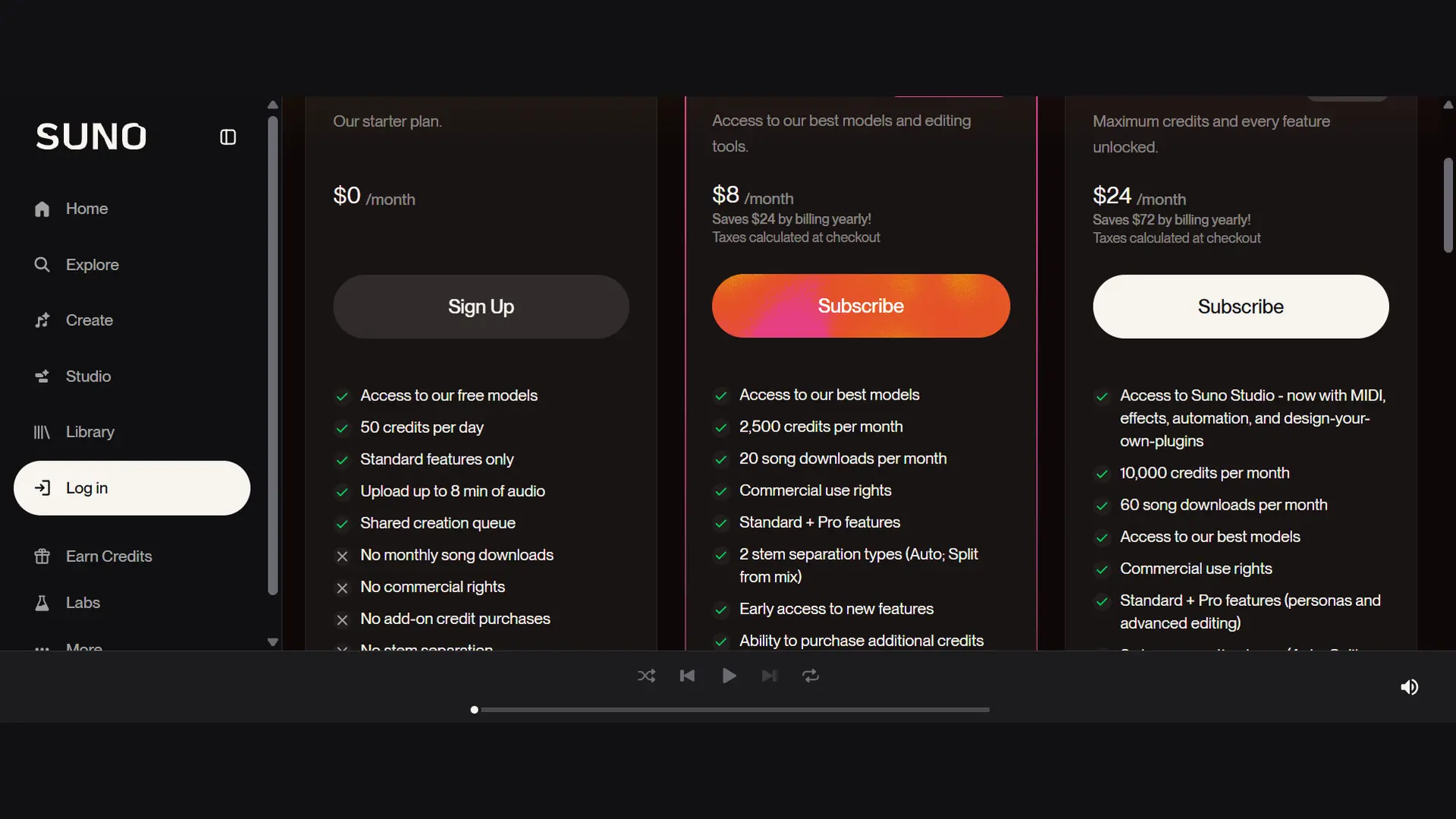
Suno runs on credits. You spend them on generations, stem splits and some other tools.
How credits are spent
- A standard generation costs 10 credits and returns two songs.
- Prompts that include many images or videos cost more.
- Max Mode, an optional setting for songs over two minutes, close covers and consistent vocals, costs more credits. Suno does not publish a figure in the help articles we read.
- Auto Split (up to 12 stems) costs 50 credits. Split from Mix costs 10 credits per stem, or 20 for both stems. Advanced Split, Premier only, costs 10 credits per stem.
- Subscription credits do not carry over to the next day or month. Purchased top-up credits do not expire but need an active subscription.
| Plan | Credit allowance | Standard generations | Songs generated |
|---|---|---|---|
| Free | 50 a day | 5 a day | 10 a day, v6-mini only |
| Pro | 2,500 a month | 250 a month | 500 a month |
| Premier | 10,000 a month | 1,000 a month | 2,000 a month |
The numbers above are simple arithmetic from 10 credits per generation, not a promise of what you will actually spend. Max Mode and image prompts change the math.
Credit budget example
Suppose you are on Pro and want to finish eight tracks this month. You try about 10 generations per track, which is 80 generations and 800 credits. You also run Auto Split on all eight, which is 400 credits. That leaves roughly 1,300 of your 2,500 credits. Your tighter limit is downloads, not credits, which the next section explains.
Ways to stretch your credits
- Draft ideas on v6-mini, then move the best idea to v6.
- Change one variable per try so each generation teaches you something.
- Edit a small section instead of regenerating the whole song.
- Extend a good short song rather than forcing a long first generation.
- Save lyrics and prompts outside Suno so a failed attempt never costs you the text.
Testing note: keep a simple log of the prompt, model, credit cost, strongest result and the change you made next. After ten songs you will know which prompts waste credits for your style. This is advice for your own workflow, not a lab result.
How to Download Suno Songs, Stems and MIDI
Since September 3, 2026, downloading is limited by plan, and the limit applies to songs you made before that date too. Streaming and sharing stay unlimited on every plan. The limits only apply to taking a file off the platform.
How downloads are counted
- One song counts as one download, in any format.
- Downloading the same song again in another format does not use another download.
- Stems belong to their song’s download. A song plus its stems is one download.
- Failed or interrupted downloads do not count.
- Monthly counts reset on your billing date. Unused downloads do not roll over.
| Plan | Downloads | Commercial use |
|---|---|---|
| Free | 7 trial downloads for the whole account (accounts created after September 3, 2026 may only get occasional trial downloads) | No. Trial downloads are personal and non-commercial. |
| Pro | 20 a month | Yes, for songs you download on the plan |
| Premier | 60 a month. Suno says work downloaded through Suno Studio is not limited. | Yes, for songs you download on the plan |
If you hit your cap, Suno lets you buy extra downloads. Check the current price in your account, because we could not verify it from Suno’s help pages.
How to download a song
Open the song in your library, open its menu and pick one of the formats listed there. Save the file and play it once to check the lyrics and the ending. Then write down the date and your plan in your project notes.
Stems, Studio exports and MIDI
Get Stems from your library needs Pro or Premier. In Suno Studio, right-click a clip and choose Split Stems. Studio 2.0 can export the full song, a time range or the multitrack as 32-bit WAV or MP3, and individual stems as WAV. A MIDI file from a stem costs 10 credits.
If you only want clean vocals or a backing track from a song you made elsewhere, a dedicated splitter such as LALAL.AI is another route.
How to Edit, Extend and Fix a Song
Edit a section or a single line
With v6 you can change one part of a finished song in plain language. An example from Suno’s own FAQ is asking for the chorus to be sung by a gospel choir. You can also change a single lyric without rebuilding the track. Select a small region for the cleanest result.
Extend, cover and remaster
Extend continues a song from where it stops. Cover recreates a track in a new style. Remaster makes an updated version of an existing song. In Simple Mode you do not have to choose between these, because Suno picks the workflow from your prompt.
Voices, Personas and Custom Models
Voices lets you add your own voice to a song. You record or upload 15 seconds to 4 minutes of singing, then read a short phrase aloud so Suno can confirm it is the same person. You must be 18 or older, and Voices is not available in every location. It is a form of voice cloning, so only use a voice you own or have clear permission to use.
A Persona saves the vocal and style of a song so you can reuse it. Custom Models go further. You train a model on your own tracks, up to three at a time on Pro and Premier, and Suno upgraded existing custom models to v6 automatically.
Audio uploads
You can upload your own recording and then extend it or cover it. Upload limits depend on your plan. Suno’s pricing page lists up to 8 minutes of audio on Free and up to 30 minutes on Premier. Only upload audio you have the right to use, because uploads and lyrics are screened for unauthorized use.
Suno Commercial Use and Ownership Explained
This is the part that can cost you the most if you guess. The answer has changed, so read it slowly.
Not legal advice. This section reports what Suno and public sources say on October 20, 2026. It is not legal advice. Rules differ by country and change often. Read Suno’s current Terms of Service and talk to a lawyer before you build income around a song.
Who owns the song
Suno’s help center says that on the Basic (free) plan Suno owns the songs and you may use them for non-commercial purposes only. On Pro or Premier, you own the songs. Suno also says that under either plan the songs may not be eligible for copyright protection.
What counts as commercial use
Under Suno’s Terms, effective September 3, 2026, paid subscribers may use commercially the output they download within their plan’s download allowance. Suno’s help center says that songs you download while subscribed carry commercial use rights, and that Suno does not take a share of your earnings. It lists streaming releases, film, TV, games and independent sales as examples. Songs on the Free plan cannot be monetized.
Songs you made on Free and want to use later
Subscribing later does not automatically give commercial rights to earlier Free songs. Suno’s help article says it does not give retroactive licensing by default, and that Suno may grant it in certain cases that are not guaranteed. Treat old Free songs as personal use unless Suno confirms otherwise in writing. Rights to songs you downloaded while subscribed stay with you after you cancel.
Ownership is not copyright
Owning a song under Suno’s terms and having a copyright are different things. The US Copyright Office’s January 2025 report on copyrightability concluded that, with current technology, prompts alone do not give enough control to make you the author of the output. Human selection, arrangement and creative changes can be protected, but only your human contribution. In March 2026 the US Supreme Court declined to review the Thaler case, which leaves in place the rule that copyright requires human authorship.
For you, that means writing your own lyrics, editing sections by hand and keeping records of your choices. Suno’s help center notes that lyrics you wrote belong to you and can usually be registered separately. Rules outside the US differ, so check your local copyright office.
The lawsuit picture, in short
- Warner Music Group settled with Suno on November 25, 2025 and signed a licensing partnership.
- Suno built its v6 models with Warner Music Group, BMG and Believe, and says they were developed with the music industry.
- Universal Music Group and Sony Music continue their case against Suno in a US federal court. Reports say a ruling on fair use is not expected before the second half of 2027.
- On July 31, 2026, the Munich Regional Court ruled for the German collecting society GEMA against Suno. It is a first-instance ruling, and Suno said it was evaluating options including an appeal.
Distribution and platform rules
You pick your own distributor, and Suno does not require you to credit it, though it appreciates a mention. You must hold the rights to everything in the song. Some distributors also exclude songs that are not eligible for copyright, so read their terms first.
Platform policies move quickly. According to a LabelGrid roundup, Spotify adopted AI disclosures in song credits and removes unauthorized voice clones, Deezer tags AI-generated tracks, and Apple Music launched Transparency Tags in March 2026. Check each platform’s own page before release. On YouTube, Content ID systems register recordings you hold exclusive rights to, so do not assume a Suno song will earn Content ID income.
From Idea to Publishable Track: A Checklist
- Write or edit your lyrics yourself, and read every generated line.
- Check that you are on Pro or Premier before you download.
- Confirm you have downloads left this billing period.
- Generate on v6 or v6-wild, and keep the strongest take.
- Edit weak sections by hand, and note what you changed.
- Download the final file and the stems you need, once.
- Save the prompt, lyrics, plan, date and download date in one folder.
- Check that the song uses no copyrighted lyrics, names or unauthorized voices.
- Read your distributor’s AI policy and add any required AI disclosure.
- Release, then keep the records for as long as the song earns money.
If you plan to cut short promo clips from the finished track, a tool like opus clip can help with the video side, and runway is one option for generating visuals to pair with a soundtrack.
Common Suno AI Problems and Fixes
| Problem | Likely cause | Fix |
|---|---|---|
| Music sounds generic | The prompt is too broad | Add subgenre, instruments, structure and mood |
| Vocal style is wrong | Vocal instruction is unclear | Specify range, tone, energy and delivery |
| Wrong genre generated | Too many conflicting styles | Use one main genre and one supporting influence |
| Lyrics sound rushed | Lines are too long | Shorten lines and balance syllable counts |
| The chorus is weak | The hook is not clearly defined | Repeat a short central phrase |
| Structure is repetitive | No structural direction | Add verse, pre-chorus, bridge and final chorus labels |
| Pronunciation is off | Complex spelling or names | Rewrite words phonetically where needed |
| The song ends abruptly | The generation reached its limit | Use Extend to build a proper ending |
| Track changes too much after editing | The edit range is too broad | Select a smaller section |
| The prompt is flagged | Restricted name or content | Remove copyrighted lyrics and artist imitation |
| Credits disappear fast | Too many repeated generations | Change one variable at a time and draft on v6-mini |
| Upload gives poor results | The reference audio is unclear | Use a cleaner, shorter source file |
| Download button is blocked | You reached your plan’s download limit | Wait for the reset date, buy extra downloads or change plan |
| An old model is missing | Models before v6 are retired | Recreate the style on v6 or v6-wild with a more detailed prompt |
When Suno is down or generation is slow
Check the official status or support channels, refresh the project and avoid resubmitting the same job. Save your lyrics and prompts outside Suno, try again outside peak hours and confirm your credits were not already deducted before you retry.
Tips for Getting Better Results With Suno
- Start with a clear genre and mood, then define the vocal style.
- Use two to four key instruments, not a dozen, and give the song one central theme.
- Write a memorable chorus, use structured lyrics and avoid stacking genres.
- Generate multiple versions before editing, and listen past the first 20 seconds.
- Use Extend instead of forcing a long first track, and edit only the weak section.
- Save the style prompts that work, and create a Persona for recurring projects.
- Track which songs you downloaded on a paid plan, and download final files before you delete projects.
Suno vs Alternatives: Which Should You Pick?
Suno is not the only choice, and the right tool depends on whether you need a downloadable file, a licensed catalog, instrumentals or stems. This is a short decision guide. Vendors change terms often, so confirm details on each tool’s own site.
| Tool | Best for | Main limit to check |
|---|---|---|
| Udio | Creating and remixing inside a licensed platform | Downloads of audio, video and stems have been disabled since October 29, 2025, per Udio’s help center |
| ElevenLabs Music | Teams already using ElevenLabs for voice, and licensed training data | Self-serve plans exclude film, TV and some game use; music credits are shared with voice products |
| Producer.ai (formerly Riffusion) | A chat-style workflow tied to Google’s Lyria model | Google acquired it in February 2026, so terms and plans are still settling |
| Stable Audio 3 | Instrumentals, textures and sound effects; open-weight small and medium models | Vocals are not the focus |
| Mureka | Lyrics-first songs and a wide developer API | It has not disclosed its training data sources |
| MiniMax Music | Low-cost generation through an API | Thin published commercial-use terms |
| AIVA, Soundraw, Mubert, Beatoven.ai, Loudly, Boomy | Royalty-free background music for video, games and podcasts | Licensing and download rules differ by plan, so read each license |
| LALAL.AI and Moises | Splitting vocals and instruments from existing audio | They separate audio. They do not write songs. |
If you mainly want voice and speech rather than songs, start with our elevenlabs alternatives page.
Imperial AI Tools Take: Is This Suno AI Guide Enough to Start?
Yes, if you follow the order: write a specific prompt, label your lyrics, budget your credits, and plan your downloads before you plan your release. Suno is excellent for fast drafts and finished demos. It is a poor fit if you need guaranteed copyright, unlimited downloads or a platform free of legal questions. Start on the free plan to learn the workflow, then move to a paid plan before you publish.
Frequently Asked Questions About Suno AI
How long can a Suno song be?
Suno can generate up to 8 minutes of music in a single generation on v6, v6-wild and v6-mini, according to its help center. You can also use Extend to add music to the end of a song. Suno recommends Max Mode for songs longer than two minutes.
How do I remove vocals from a Suno song?
Use stem separation. Open Get Stems on a song in your library, choose Split from Mix and pick the vocal or the instrumental. It costs 10 credits per stem, or 20 credits for both, and it needs a Pro or Premier plan. Auto Split can separate up to 12 stems for 50 credits.
Does Suno work offline?
Suno generates songs on its servers, so you need an internet connection to create music. The only offline feature in Suno’s release notes is saving playlists on mobile for listening without a network, added on August 20, 2026.
Are my Suno songs private?
Suno’s help center says songs are not public by default. A song has a visibility setting that you can switch between Link Only and Public, and only Public songs are eligible for the home page. Personas are the exception, because they are public by default, so switch them to private if you prefer. Anyone with a Link Only link can open that song.