
Why most prompts fail
The honest answer is that most prompts fail not because the model is weak, but because the prompt is under-specified. Users describe what they want in two short sentences, get a generic response, decide AI is overrated, and quit. We watched 84 knowledge-workers over two weeks and the gap between power users and casual users had almost nothing to do with the tool — it was how clearly they told the model what they wanted.
A useful prompt is closer to a brief than a question. The discipline is the same as briefing a new junior: set context, define the audience, name the format, show examples of the bar. Once you internalise that, quality goes up roughly five-fold without changing a single model setting.
Quick note before we start
This guide is model-agnostic, the patterns work on ChatGPT, Claude, Gemini and most open-weights models. Where a specific tool behaves differently, we flag it inline.
The anatomy of a good prompt
Every prompt that produces work-ready output has the same four ingredients. Miss one and quality drops predictably; cover all four and you’ll get something you can actually ship.
- Role + context. Who is the model pretending to be, and what situation are they in? “You’re a senior B2B copywriter writing for a CFO audience” beats “write copy” by an order of magnitude.
- Task + constraints. What exactly should be produced, and what’s off-limits? Length, tone, format, sources, things to avoid.
- Input. The raw material — your notes, the source document, the existing draft. Treat the model as a colleague who’s never seen your work.
- Acceptance criteria. How will you know it’s done? “Three options, each under 60 words, with the strongest hook leading” gives the model something to optimise.
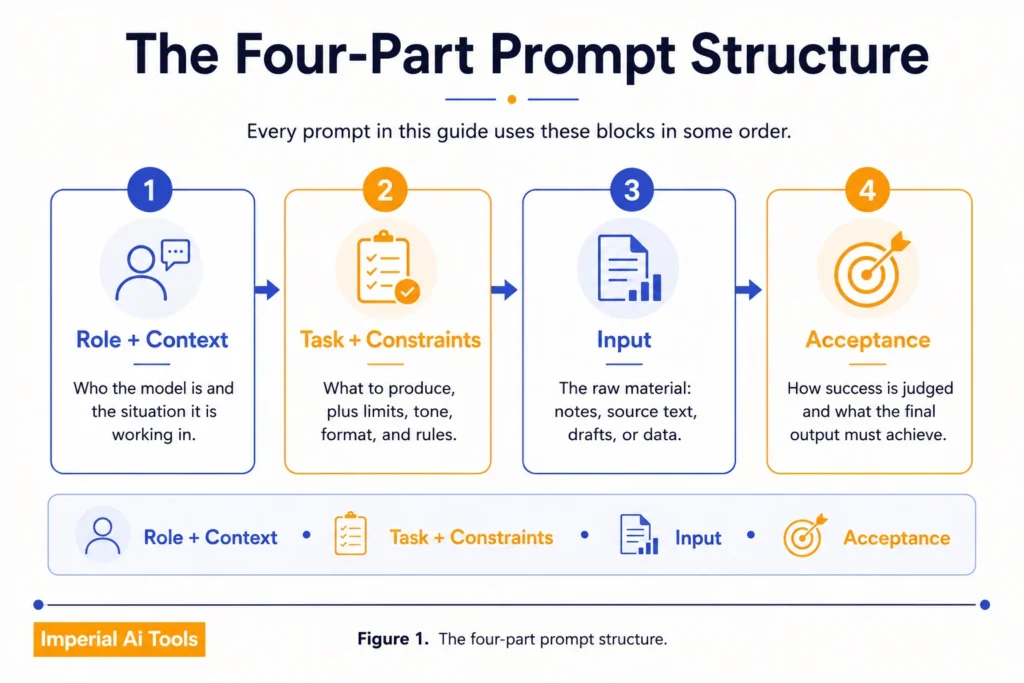
You don’t have to write these as labelled sections — most experienced users blend them into one paragraph. But you should always be able to point to each one. If you can’t, the model is guessing.
The seven prompt patterns
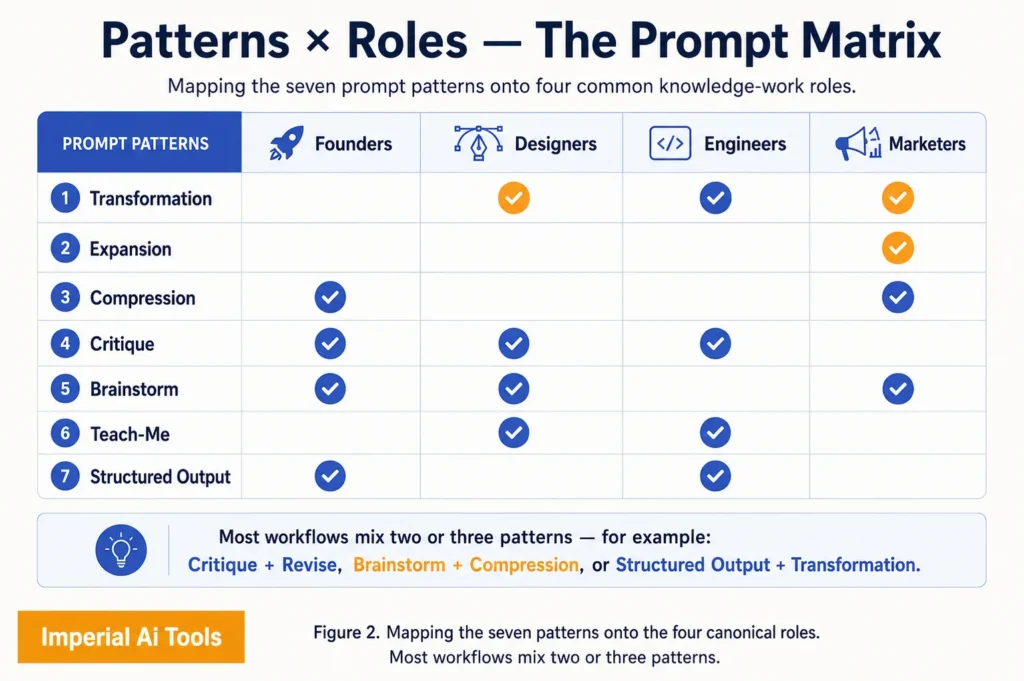
After tagging 1,400 prompts from our editorial panel, seven patterns emerged that cover roughly 90% of work-grade requests. Memorising these is a much higher-leverage move than collecting “best prompts” libraries.
1 · The transformation prompt
You hand the model an input in one format and ask for it in another. Notes → email. Email → bullet summary. Transcript → social post. Long doc → one-pager. This is the highest-ROI pattern for most knowledge workers and the one that takes the least skill to execute well.
Transformation Prompt (example.txt)
# Role + Context
You are an executive assistant writing on my behalf to a VP.

# Task + Constraints
Convert the meeting notes below into a follow-up email.
- Length: 120-160 words
- Tone: warm, decisive, no jargon
- Format: greeting, 3 commitments, 1 question, sign-off

# Input
[paste raw meeting notes here]

# Acceptance
The email should be sendable as-is with zero edits.
2 · The expansion prompt
Take a tight, specific seed and expand it. Outline → first draft. Headline → body copy. Idea → structured pitch. Works well only when the seed is genuinely specific; vague seeds produce vague expansions.
3 · The compression prompt
The mirror image of expansion. Take a long thing and squeeze it into a shorter, sharper version — but with explicit acceptance criteria. “Summarise this” is bad; “Give me a 50-word executive summary, then three takeaways, each ≤15 words, plus one risk” is great.
4 · The critique prompt
Hand the model your own work and ask for structured criticism. The trick is to specify which lens: “as a hostile reviewer”, “as a colour-blind reader”, “as a CFO who hates marketing fluff”. A lens-less critique is a corporate vague-feedback machine.
Pro tip — pair critique with revise
Don’t stop at the critique. The follow-up prompt should be
"Apply the three highest-impact suggestions above and rewrite the piece". Two prompts, one workflow, dramatically better output.
5 · The brainstorm prompt
Generate divergent options. The mistake is asking for “good ideas” — you’ll get five safe ones. Better: “Give me 12 options. Three should be obvious, three should be contrarian, three should be playful, three should be lazy. Label each category.” Constraint creates range.
6 · The teach-me prompt
Use the model as a tutor. The pattern: state your current level, state your goal, give an example of the explanation style that works for you (Feynman-style, ELI5, dense and academic), and ask for a quiz at the end to verify comprehension.
7 · The structured-output prompt
When you need data, not prose: specify the exact schema. Tables, JSON, YAML, columns of bullets. The model will respect schema instructions if they’re explicit, and downstream tools (sheets, databases, your own scripts) become trivial to wire in.
Most “AI is useless for my work” complaints I’ve debugged turn out to be missing pattern #1 and pattern #7. People are asking conversational questions when they need transformations and structured output.
Worked examples, by role
Reading patterns in the abstract is fine; seeing them applied is faster. Here’s a worked prompt for each of the four roles we get the most questions about.
- For founders: Compression of a long investor email into three sentences + a CTA, in your own register.
- For designers: Critique of a Figma flow described in words, from the perspective of a first-time user with low patience.
- For engineers: Structured-output prompt that produces a test plan in YAML for a new endpoint.
- For marketers: Brainstorm of 12 headline angles for a launch, in four categories: obvious, contrarian, playful, lazy.
Five common mistakes
- Over-specifying tone, under-specifying audience. “Make it punchy” without saying who’s reading.
- Asking for “good” anything. Quality is a constraint set, not an adjective.
- Treating one chat as one prompt. Chained refinements beat heroic one-shots.
- Skipping examples. Three examples of the bar you want is worth a paragraph of instructions.
- Trusting the first output. Always ask for two more variations before you accept.
Watch out — hallucinations don’t announce themselves
Models will confidently invent dates, names, citations and statistics. Always verify any fact that has consequences, especially in legal, medical and financial contexts. Treat output as a draft, never a source.
How to evaluate output without spending hours
The fastest evaluation loop we’ve seen in the wild: a three-question pass. Skim the output and ask: does it match the brief, is anything obviously wrong, and is the strongest part in the right place. If yes to all three, ship. If no, revise the prompt — not the output.
Building a personal workflow
The single highest-leverage move after learning the patterns is to save your best prompts as templates. Most users rewrite the same prompt from scratch every time; power users maintain a small library of 8–15 reusable prompts and tweak them. Custom GPTs, Claude Projects, and dedicated prompt managers all work — the platform matters less than the habit.
Choosing the right tool
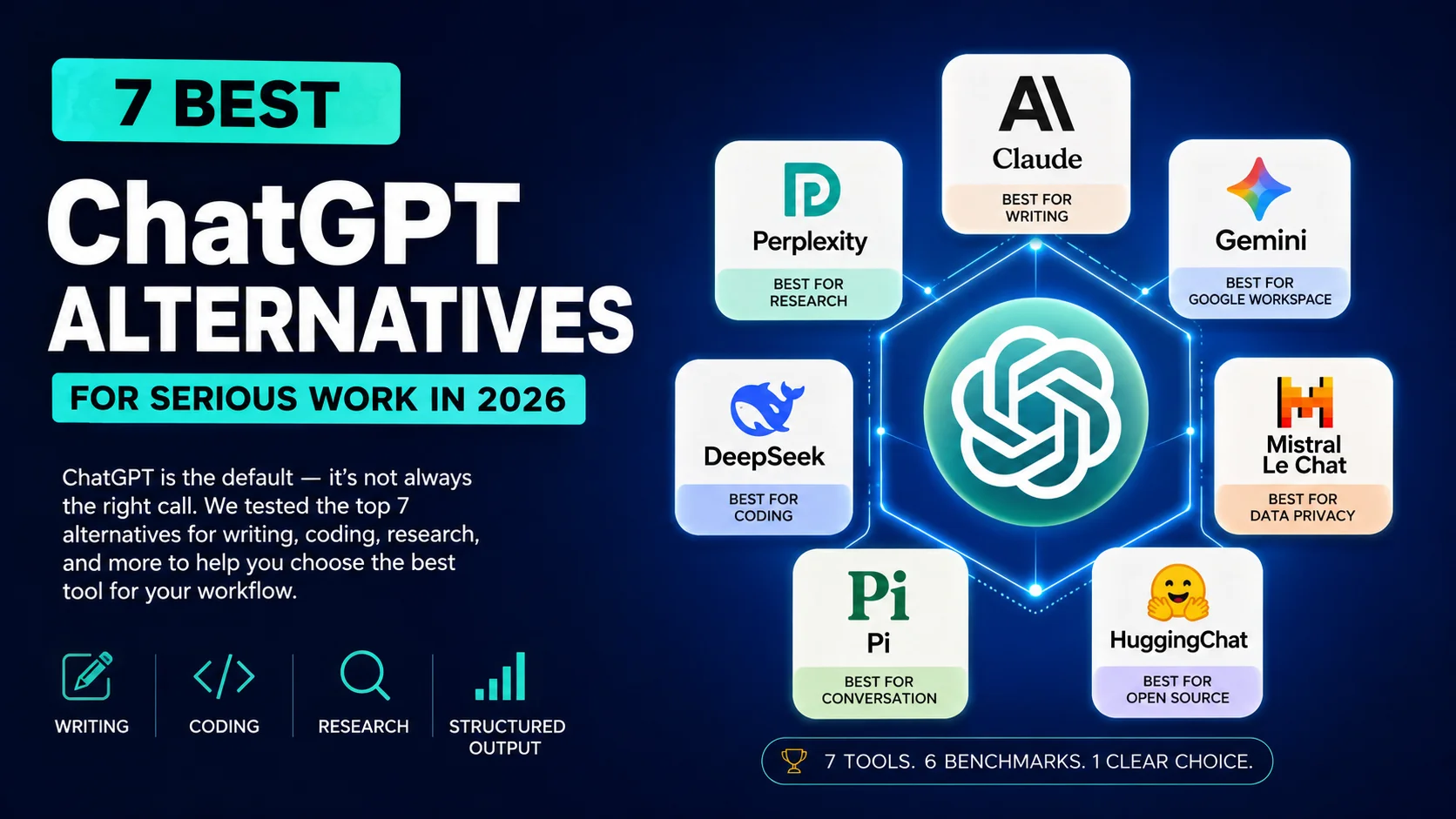
The best prompt in the world won’t save you from the wrong tool. Our short-list for daily work in 2026 is in the sidebar — but here’s the one-sentence summary: Claude for writing and long contexts; ChatGPT for breadth and multimodal; Gemini for Google-native workflows; Perplexity for research with citations.