A lot of writers search What Is the Best Humanizer AI when what they really need are two different things: an AI detector like GPTZero, and a separate tool for rewriting. It’s an easy mix-up to make, but the two jobs work very differently.
In this guide, we’ll break down exactly what GPTZero does, how accurate it really is, and how much it costs. We’ll also point you toward tools that are better suited for natural, human-sounding rewriting, since that’s not what GPTZero is built for.
This guide is written for students, teachers, and content teams who want a simple, honest comparison before picking a tool. No confusing jargon, no exaggerated claims just a clear look at what each tool is actually good at, so you can choose the right one for your specific need instead of hoping one tool does everything.
Quick Answer
GPTZero is an AI detector, not a dedicated humanizer, so it will not answer what is the best humanizer AI on its own. Use GPTZero to review AI writing signals and sentence-level highlights. For rewriting text so it reads more naturally, Grammarly is the strongest all-around option, and QuillBot is a solid free alternative.
What Is GPTZero?

GPTZero is an AI-content detection platform built to identify text patterns commonly associated with large language models. GPTZero was launched in January 2023 by Edward Tian, then a student at Princeton. The GPTZero AI detector reviews writing for signals typical of generated text rather than rewriting the text itself.
It works with content from ChatGPT, GPT-5, Claude, Gemini, Llama, and other major models. Educators, students, publishers, recruiters, and businesses use the GPTZero checker to screen written work. The GPTZero AI text detector supports English, German, Spanish, French, and Portuguese. It offers browser, Google Docs, Canvas, API, and Zapier integrations, alongside plagiarism checking, grammar checking, and authorship verification.
Pro Tip: GPTZero is not the same product as ZeroGPT, and it is not officially written as GPT 0, GPT Zero, or ChatGPT Zero. The official GPTZero website describes it as an AI detector, not a dedicated AI humanizer.
History of GPTZero
Edward Tian developed GPTZero while studying at Princeton, aiming to help identify AI-generated misinformation and support educators working with AI-assisted writing. The tool started as a simple detection interface and has since grown into a broader writing-authenticity platform.
It now includes Advanced Scan, Writing Report, authorship verification, plagiarism detection, and several integrations. GPTZero currently serves users across education, publishing, recruitment, and professional writing.
Every human wants to know the truth
How Does GPTZero Work

GPTZero uses a few core signals to assess whether text looks machine generated. Here is the process in plain language.
Text Pattern Analysis
GPTZero analyzes patterns associated with machine-generated writing, including:
- Predictability in word choice
- Repeated phrasing
- Sentence structure
- Vocabulary patterns
- Variation in sentence length
- Stylistic consistency
Perplexity
Perplexity relates to how predictable the next words in a passage appear to a language model. Text with low perplexity reads as more predictable, while higher perplexity suggests less predictable phrasing. Neither low nor high perplexity alone proves who wrote a passage.
Variability
Variability looks at variation across a passage, including sentence length, word choice, syntax, and writing rhythm. Human writing tends to vary more than machine-generated text, though this is a pattern, not a guarantee.
Document-Level and Sentence-Level Results
GPTZero produces an overall document classification alongside color-coded sentence highlights, which can show mixed human-and-AI indicators. Advanced Scan adds explanations, and the Writing Report and authorship verification tools add further context. Longer prose generally produces more useful results than isolated sentences, since short samples give the model less pattern data to work with.
GPTZero Features

GPTZero packages its detection engine with several supporting tools. Here is what each one does and who it suits best.
| Feature | What it does | Best for |
|---|---|---|
| Basic AI Scan | Provides a quick AI-content assessment | Occasional users |
| Advanced AI Scan | Offers deeper probability and sentence analysis | Educators and publishers |
| AI Vocabulary | Identifies words commonly associated with AI writing | Editors and writers |
| Writing Report | Records the writing and revision process | Students and authors |
| Plagiarism Checker | Finds potentially copied material | Education and publishing |
| Grammar Checker | Identifies spelling and grammar issues | General writing |
| Authorship Verification | Helps demonstrate how a document was created | Students and professionals |
| Hallucination Detector | Reviews citations and potentially unreliable claims | Researchers |
| Chrome Extension | Checks content while browsing or using Google Docs | Everyday users |
| API and Zapier | Connects detection with other workflows | Developers and teams |
GPTZero is an AI-content detection platform built to identify text patterns commonly associated with large language models, while ZeroGPT provides another browser-based option for screening AI-style writing.
How to Use GPTZero Step by Step
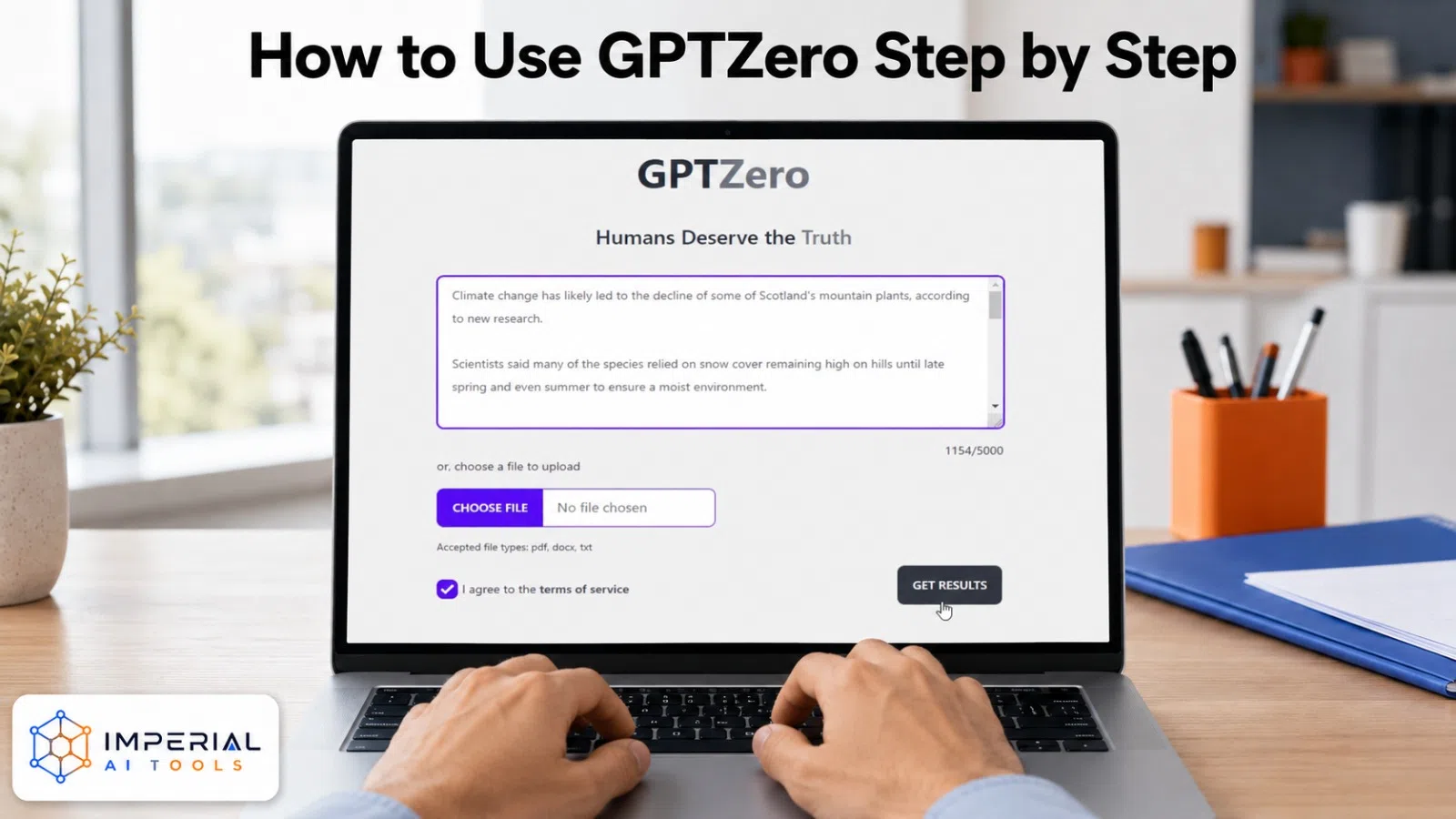
Open GPTZero
Visit the official GPTZero website and choose the basic scanner, or sign in for additional features and higher word limits.
Paste or Upload Your Text
GPTZero supports several workflows:
- Paste text directly into the scanner
- Upload a document
- Use the Chrome extension
- Scan inside Google Docs
- Use an institutional integration such as Canvas
Start the Scan
Submit enough continuous prose for a more useful assessment. Short snippets give the detector less pattern data to work with.
Review the Overall Result
GPTZero returns a likely category for the document. Treat this as a starting signal, not final proof of authorship.
Examine Highlighted Sentences
Review flagged patterns such as:
- Generic transitions
- Repetitive syntax
- Uniform sentence length
- Vague explanations
Review the Writing Manually
Do not rewrite sentences simply to manipulate the score. Improve specificity, factual detail, personal reasoning, and clarity instead.
Save the Report
Downloadable reports or writing records can be useful for students documenting their process or for editors keeping an audit trail.
How to Evaluate GPTZero Results
After a scan, GPTZero users may see several types of output:
- An overall probability or classification
- Sentence-level highlights
- Mixed human-and-AI results
- Explanations from Advanced Scan
- Indicators relating to writing patterns
| Result | What it may indicate | Recommended action |
|---|---|---|
| Mostly human | Few patterns associated with AI writing | Complete normal fact-checking |
| Mixed | Some sections differ stylistically | Review highlighted sections |
| Mostly AI | Many machine-like patterns were identified | Verify origin and writing process |
| Uncertain | Evidence is not strong enough | Use context and additional review |
A detector score is evidence to review, not proof of cheating, plagiarism, or authorship. Treat it as one input alongside writing history, context, and a conversation with the writer when the stakes are high.
Who Should Use GPTZero?
- Educators
- To review writing patterns and begin conversations about authorship.
- Students
- To check how their work may be classified and preserve writing history.
- Publishers
- To screen submitted drafts alongside editorial review.
- Content teams
- To assess AI-assisted material and check originality.
- Recruiters
- To review written applications or assessments carefully.
- Researchers
- To study AI-generated language patterns.
- Businesses
- To support content-quality workflows.
GPTZero is not ideal for:
- People seeking a one-click rewriting tool
- Users wanting guaranteed detector outcomes
- Anyone trying to establish misconduct from one score
- Writers needing comprehensive style or brand-voice editing
Is GPTZero Accurate and Reliable?
GPTZero reports strong accuracy on its current models, but as our independent GPTZero accuracy test results show, no detector should be treated as perfect, and the same question hangs over its similarly named rival see how accurate Zerogpt really is. Its own guidance states that results should not serve as the sole basis for punishment or a final verdict.
Several factors affect accuracy in practice:
- Document length
- Language
- Text type
- AI model used
- Manual editing
- Paraphrasing
- Unusual writing styles
- ESL writing
- Technical or formulaic content
The independent RAID benchmark is a useful outside reference point. Researchers built the dataset from more than six million machine-generated text samples, covering eleven models, eight writing domains, and multiple adversarial attacks. Their findings showed that detection performance can drop noticeably when text comes from unfamiliar models, unfamiliar domains, or has been paraphrased or lightly edited. This supports treating any single detector score with some caution, especially on edited or paraphrased text.
GPTZero Pricing and Free Plan

Prices may change, and annual billing consistently costs less per month than monthly billing. Team seats often use custom pricing, and API pricing is billed separately from the standard plans. Readers should check the official GPTZero pricing page before purchasing, since plan structures shift periodically.
GPTZero Pros and Cons
| Pros | Cons |
|---|---|
| Free plan available | Cannot prove authorship by itself |
| Basic and Advanced Scan options | False positives remain possible |
| Sentence-level highlighting | Short passages can be less reliable |
| Supports several major AI models | Results may change after model updates |
| Chrome and Google Docs integrations | Not a dedicated AI humanizer |
| Writing Report and authorship tools | Premium features require payment |
| Useful for educators and publishers | Different detectors may disagree |
| API and team integrations | Requires contextual human review |
GPTZero is a capable detector with real limitations. It works best as one signal among several, not a final judgment.
Common Mistakes to Avoid
- Treating a single GPTZero score as proof of cheating or plagiarism. Detector output is evidence to review, not a final verdict, especially given documented false positive rates.
- Editing sentences purely to lower an AI score instead of improving the actual writing. This can make content vaguer without making it more genuinely human.
- Expecting GPTZero to rewrite or humanize text. It flags patterns rather than generating a rewritten version, so pair it with AI Text Cleaner for AI-generated drafts when hidden Unicode or Markdown residue needs cleaning before publication.
GPTZero Alternatives and Comparisons
Looking for more ways to detect or polish AI-generated content? Our GPTZero alternatives roundup breaks down the top detection tools worth trying, and if you’re torn between two popular options, our ZeroGPT vs GPTZero comparison shows exactly where each one shines.
On the rewriting side, our Grammarly AI guide covers everything you need to sharpen your writing, while our QuillBot vs Grammarly breakdown helps you pick the assistant that best fits your workflow so you can write and edit with total confidence.
Imperial AI Tools Take
GPTZero is a great pick if what you really need is detection, not rewriting. It comes with a free plan, highlights sentences that look AI-written, and works well with tools schools and publishers already use. That makes it a solid fit for teachers, editors, and content teams who just want to check text quickly. If you’re just starting out, the free plan is enough for occasional checks. Only move up to the Essential plan if you need to check longer pieces or want plagiarism checking built in.
One thing to keep in mind: GPTZero won’t tell you the best humanizer AI to use. That’s because detecting AI writing and rewriting it to sound more human are two completely different jobs. One tool spots AI content, the other helps you rework it and GPTZero is built only for the first one. So if your main goal is humanizing text, you’ll want to pair it with a separate rewriting tool instead of expecting GPTZero to do both. Think of it as a checker, not a writer. Once you understand that difference, it becomes much easier to pick the right tool for whichever task you’re actually trying to get done.
Frequently Asked Questions
Sign up for a free GPTZero account, no credit card required. The free plan allows up to 10,000 words a month with core detection, sentence highlighting, and the Chrome extension.
GPTZero is directly accessible to individuals, while Turnitin is commonly integrated into institutions and includes broader academic-integrity workflows built for schools. If your course specifically uses Gradescope, our guide on whether Gradescope detects AI explains how that platform’s own AI features differ from Turnitin’s separate scoring system
Predictable wording, uniform sentence length, short samples, or technical writing can produce patterns that resemble generated text, which is why results need human review.
GPTZero is directly accessible to individuals, while Turnitin is commonly integrated into institutions and includes broader academic-integrity workflows built for schools.