Cancelling Semrush shouldn’t feel like a maze, but plenty of users get stuck at the same step and end up paying for another month they didn’t want. This guide walks you through exactly how to cancel Semrush subscription billing on both desktop and mobile, covering the Subscription Info page, the Recurring payment setting, and the email confirmation step Semrush requires before a cancellation actually counts. You’ll also learn what to export before your access ends, how the free trial cancellation window works, and what Semrush’s refund policy actually allows in 2026 since eligibility is narrower than most people assume.
By the end, you’ll know precisely how to stop the charge, confirm it worked, and decide whether canceling outright or downgrading makes more sense for you.
Quick Answer
To cancel your Semrush subscription, go to Subscription Info from your profile icon, click Active next to Recurring, complete the cancellation form, then click the confirmation link in the email Semrush sends within 24 hours. This guide walks through every step for desktop, mobile, and free trial cancellations plus the exact refund rules that apply in 2026.
Create something cool and useful for the industry.
What to Do Before Canceling Semrush
Check Your Billing Cycle and Renewal Date
Open Subscription Info and note the plan name, whether billing is monthly or annual, the next renewal date, any additional users on the account, and any paid toolkits or add-ons attached to it. Semrush bills in advance, so canceling after a renewal date has already passed will not undo that charge.
Export Your Important Semrush Data
Export anything you might need later, before your paid access ends:
- Keyword lists and Keyword Magic Tool exports
- Position Tracking reports
- Site Audit results
- Backlink Analytics reports
- Competitor research data
- PDF or scheduled reports
- Content briefs and project settings, where export is possible
Remove Unnecessary Users and Add-Ons
Canceling the main subscription does not tell Semrush which separate toolkits, additional user seats, or Base and Pro Report add-ons to remove. Check every paid line item in your account settings before you submit the cancellation form, so nothing keeps billing after your plan itself is canceled.
Save Billing Records
Download your invoices and record the account email address, transaction ID, billing dates, the last four digits of the card on file, and the date you submit your cancellation request. Semrush asks for this same information if a refund request or support ticket is needed later.
How to Cancel Semrush Subscription on Desktop

This is the official self-service path for how to cancel Semrush subscription access from a desktop browser.
1. Sign In to the Correct Semrush Account
Go to Semrush.com and log in using the email address connected to the paid account. Confirm you have account-owner or billing permissions, since a team member account without billing access cannot complete the cancellation form.
2. Open Subscription Info
Select the profile icon in the top-right corner of the dashboard, then choose Subscription Info from the dropdown menu.
3. Find the Recurring Payment Setting
Locate the Recurring row on the Subscription Info page. Select the Active link beside it, then follow the Contact Us prompt that appears to reach the official cancellation form.
4. Complete the Cancellation Form
Answer every mandatory question in the exit flow, including a primary reason for canceling. State clearly which subscription or add-on you want to cancel, confirm your account details are accurate, and submit the request. In the additional-comments field, explicitly state a refund request if you believe you qualify, because Semrush requires this to be stated in writing at the time of cancellation.
5. Confirm the Request by Email
Open the cancellation email Semrush sends to your account address and select the confirmation link inside it. Semrush states it will confirm a properly submitted cancellation within 3 business days. Save the final confirmation email as proof the recurring charge has been stopped.
Common mistake
Submitting the cancellation form but never opening the follow-up email leaves the request incomplete. Semrush’s process explicitly requires you to answer every question on the form and, in some flows, click a second confirmation link inside a separate email before the cancellation is actually processed.
How to Cancel Semrush Subscription on Mobile

Semrush does not run a separate cancellation flow for its mobile app. You cancel Semrush subscription billing through the same account-management process, opened in a mobile browser.
- Open Semrush.com in your phone’s browser and sign in to the paid account.
- Tap the account or profile menu icon.
- Select Subscription Info.
- Find Active next to Recurring and tap it.
- Open and complete the cancellation form, answering every required question.
- Confirm the request through the email Semrush sends to your account address.
If you are cutting subscriptions and need a capable free AI assistant for writing and research, check what the Claude free plan covers and whether a trial promotion applies to your account.
Pro tip
If the billing menu is hard to tap on a small screen, switch your mobile browser to desktop-site mode. Use a laptop or desktop computer instead if the cancellation form does not display correctly on mobile.
How to Cancel a Semrush Free Trial
Semrush currently runs a seven-day free trial that requires a credit card at signup. If you begin a subscription with a free trial, your first payment will be charged automatically at the end of the trial period unless you cancel beforehand. To cancel a Semrush free trial before that charge:
- Sign in before the trial expiration date.
- Open Subscription Info from the profile menu.
- Follow the same Active beside Recurring, then cancellation-form process described above.
- Complete the email confirmation step.
- Keep the final confirmation message as proof.
Avoid this
Do not rely on deleting projects, uninstalling the app, or simply not logging back in. None of these stop the trial from converting into a paid charge. For unpaid trial or free subscriptions, cancellation takes effect within 3 business days of receipt of your request, but only once you submit it correctly through the form.
What Happens After Canceling Semrush?

Cancellation will take effect at the end of your committed subscription term, so you generally keep paid access until that date rather than losing it immediately. Automatic renewal stops once Semrush confirms the cancellation. Some reports, keyword limits, and paid features become unavailable once the term ends. Cancellation on its own does not delete your account or your saved data, and it does not automatically release you from payment obligations you already agreed to for the current term.
If you had a paid plan, Semrush’s own knowledge base notes that project and website monitoring data is generally kept for 30 days after cancellation, in case you decide to resubscribe. Do not assume this window is unlimited: export anything important before the term ends rather than relying on it.
| Action | Stops renewal? | Deletes account? | Refund guaranteed? |
|---|---|---|---|
| Delete a project | No | No | No |
| Stop using Semrush | No | No | No |
| Cancel paid subscription | Yes, after confirmation | No | No |
| Delete Semrush account | Not a substitute for proper cancellation | Yes | No |
| Submit eligible refund request | Not by itself | No | No |
Semrush Cancellation and Refund Policy
Semrush’s official Cancellation and Refund Policy, applicable to online purchases made directly on Semrush.com by credit card, lays out clear terms. You may cancel your subscription at any time. Cancellation will take effect at the end of your committed subscription term or, for unpaid trial or free subscriptions, within 3 business days of receipt of your request, provided the request was made in accordance with the policy. Semrush confirms the cancellation of a subscription within 3 business days after receipt of a properly submitted cancellation request.
Refund eligibility is narrower than most people expect. Semrush offers a one-time, 7-day money-back guarantee, limited to initial subscription purchases where the committed term is twelve months or greater, and to initial add-on purchases incremental to an existing subscription. Refunds are only available to customers who purchased directly from Semrush.com using a credit card, and refunds are not available for month-to-month subscriptions.
To be eligible, a written refund request must be submitted within 7 calendar days of placing the initial annual subscription order or the initial add-on order. If a subscription is canceled during an existing term without a refund request made in that same window, the customer is not entitled to a refund of prepaid or committed amounts for that term, though the subscription can still be canceled before the next renewal to avoid a future charge.
A refund request must explicitly state the request in the additional comment field of the cancellation form, or be submitted through the Semrush contact form with account details included. If the request is properly submitted within the 7-day window, Semrush processes the refund within 30 calendar days of receiving the written request and the reasonably requested identity information.
Pro tip
State your refund request in writing, in the comments field, at the same time you submit the cancellation form. Waiting until after the form is submitted to ask for a refund separately can add delay and, outside the 7-day window, will not qualify at all.
Canceling Semrush vs. Deleting Your Account
Canceling a subscription and deleting a Semrush account are two different actions with different outcomes.
| Canceling a subscription | Deleting an account |
|---|---|
| Stops future paid renewal after processing | Permanently closes the account |
| May preserve a limited free account | Can remove saved account data |
| Does not guarantee a refund | Does not erase previous payment obligations |
| Best when leaving a paid plan | Best when no longer needing the account at all |
Cancel your paid Semrush subscription correctly first, then request permanent account deletion afterward if you want the account itself gone. Deletion generally requires a separate support request and email verification, and full deletion can take time to process after confirmation, subject to Semrush’s data retention obligations.
Semrush Pricing Before You Cancel
Semrush’s plan lineup changed in 2026. Checking your exact plan and billing cycle in Subscription Info helps you understand when cancellation takes effect and whether you are inside a refund-eligible window.
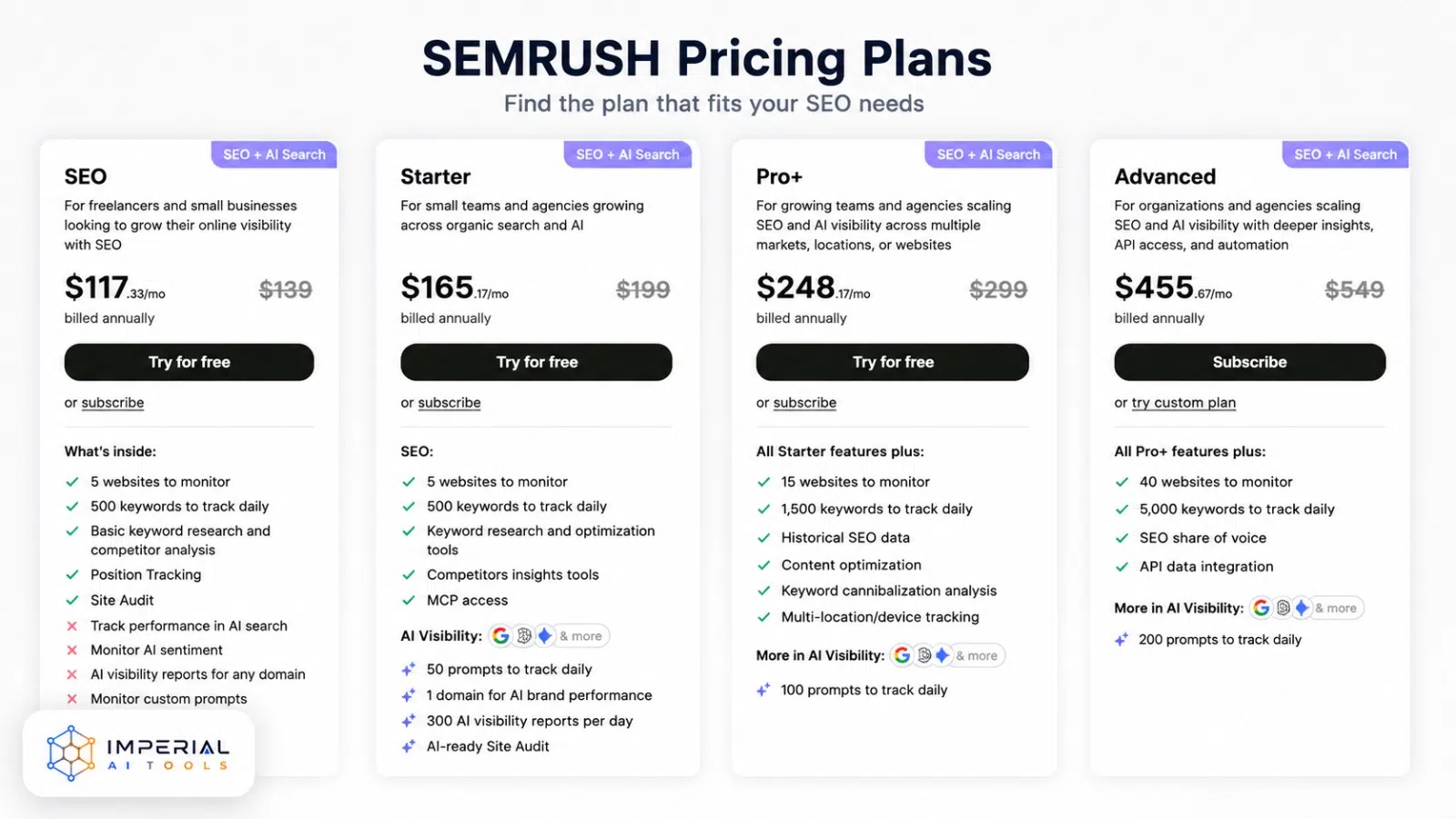
Prices, plan names, and offers change. Confirm your current subscription details inside your own Semrush account before canceling. Semrush also sells separate add-ons, including additional user seats starting near $45 per month, Base Reports near $10 per month, and Pro Reports near $20 per month, each of which bills independently of the main plan.
Common Mistakes to Avoid
- Assuming a support email alone cancels the subscription. Semrush’s self-service form is the primary path, and the account must be logged in with every question answered, or the request can be denied outright.
- Canceling on the renewal date instead of before it. Semrush bills in advance, so canceling on the day of renewal, rather than before it, will not stop that charge from going through.
- Forgetting separate add-ons. Extra user seats, Base Reports, and Pro Reports bill independently of the main plan. Canceling the plan alone can leave an add-on still charging your card.
- Assuming an annual plan is refundable at any point during the year. The 7-day money-back window only applies to the initial purchase, not to renewals or to requests made later in the term.
What to Do When It Goes Wrong
Most stuck cancellations trace back to one of three problems.
- No billing permissions
- If the logged-in account cannot see a cancellation option, you are likely using a team-member login rather than the account owner. Sign in with the owner’s credentials, or ask the owner to submit the request.
- Missed email confirmation
- The cancellation form alone does not always finish the job. Check your inbox, including spam, for a message from Semrush and click the confirmation link inside it.
- Charged again after canceling
- Contact Semrush Support directly through the official contact form with your account email, transaction ID, and the date of the unwanted charge, since a cancellation submitted after the renewal date will not retroactively refund that charge on its own.
If you were charged after submitting the form: the charge likely processed before the cancellation was confirmed. Contact Semrush Support with your account email, the transaction ID, and the date the form was submitted. Semrush does not automatically refund charges that occurred because the email confirmation step was skipped or delayed.” Then add: “Semrush phone support: 1 (800) 815-9959, Monday–Friday 08:00–16:00 GMT.
Alternatives After Canceling Semrush Account
Canceling the paid plan does not force a tool switch: a limited free Semrush account is available, and several lower-cost alternatives cover the core keyword and rank-tracking functions. Consider whether a full cancellation is really the right move, or whether one of these fits better:
- Downgrade to a lower Semrush tier instead of canceling completely.
- Remove unused toolkits or additional user seats to cut the monthly cost.
- Move to Semrush’s limited free account for occasional lookups.
- Compare a lower-cost SEO platform if Semrush’s price no longer fits your budget.
Whether to switch tools or stay on a lighter plan depends on how often you need keyword data. Monthly users rarely need a Pro+ or Advanced plan: a lower Semrush tier or a single-tool alternative often costs a third of the price.
Is Canceling Semrush Worth It? Our Verdict
Canceling Semrush is straightforward once you know the exact path: Subscription Info, the Active link beside Recurring, the cancellation form, then the email confirmation. Most people who feel stuck simply missed that last email step. The fastest way to cancel Semrush subscription billing cleanly is to export your data first, submit the form in one sitting, and open your inbox immediately afterward to confirm. One honest caveat: refund eligibility is narrow, limited to an initial 12-month-or-longer purchase within 7 days, so do not expect a refund on a routine monthly cancellation.
Frequently Asked Questions
Yes, you can cancel a Semrush subscription at any time. Cancellation normally takes effect at the end of your committed subscription term and does not remove payment obligations you already agreed to.
You may be logged into an account without billing permissions, or you may have missed the email confirmation link, or left a question blank on the cancellation form. Contact Semrush Support with your account details if the issue continues.
Look for the final confirmation email from Semrush, sent within three business days of a properly submitted request, and check that the Recurring status under Subscription Info no longer shows Active. Keep the email and request date for your records.
Sign up on Semrush.com with a credit card to start the seven day free trial, then use the toolkit before the trial ends. Cancel through Subscription Info before the trial expiration date if you do not want the first paid charge.
Only if you are within the 7-day money-back window that applies exclusively to initial annual plan purchases. Canceling mid-year outside that window stops future renewals but does not entitle you to a refund of the remaining months already paid. Month-to-month plans are not refundable at any point.
No. Canceling a paid Semrush subscription stops future billing but does not delete your account or your saved data. Your account downgrades to a limited free plan. If you want the account itself permanently deleted, that requires a separate request to Semrush Support after the subscription ends.