To cancel your ChatGPT subscription, go to the platform that billed you not the ChatGPT app itself. Web subscribers cancel through chatgpt.com > Settings > Billing. iPhone and iPad users cancel through Apple Subscriptions in iOS Settings. Android users cancel through Google Play. Business workspace owners cancel through Workspace Settings > Billing.
The process takes under five minutes on any platform. The biggest mistake people make is trying to cancel in the wrong place or assuming that deleting the app stops the charge. It doesn’t. This guide walks through every method and shows you how to confirm the cancellation actually worked.
Quick Answer
To understand how to, first identify who manages your billing. Cancel a web purchase through ChatGPT Billing settings, an iPhone purchase through Apple Subscriptions, and an Android purchase through Google Play Subscriptions. Business subscriptions must be cancelled by a workspace owner. Complete the process at least 24 hours before renewal and check that automatic renewal is turned off.
Where You Subscribed Decides Where You Cancel
| Where the reader subscribed | Billing provider | Where to cancel |
|---|---|---|
| chatgpt.com | OpenAI | ChatGPT Billing settings |
| iPhone or iPad app | Apple | Apple Subscriptions |
| Android app | Google Play Subscriptions | |
| Self-service Business workspace | OpenAI | Workspace billing settings |
How to Cancel ChatGPT Subscription Based on Where You Paid

A ChatGPT plan is billed by one of three companies: OpenAI, Apple or Google. The cancel button only appears on the platform that actually charged you, so this is the step most people skip.
Check your original receipt
Search your email for the receipt you got when you subscribed. It will name the billing provider directly: OpenAI, Apple or Google. If you cannot find the email, check your bank or card statement instead, since the merchant name usually tells you the same thing. Some people end up holding two active subscriptions on different platforms by accident, so check every account you own.
Sign in to the correct account
Use the exact ChatGPT, Apple or Google account you used when you first paid. Signing in with a different email or a different login method can make the paid plan look like it disappeared, when it is simply attached to another account. For Business plans, confirm you actually hold workspace-owner billing permissions before you start.
Check the renewal date
Note your next billing date before you cancel anything. Cancel at least 24 hours before your renewal date to avoid being charged for the next period. A normal cancellation stops the next payment. It does not remove access you already paid for, so you keep using ChatGPT until the period ends.
How to Cancel ChatGPT Subscription on the Website

This method only works for a plan bought directly on chatgpt.com. It covers chatgpt Plus, Pro and Go plans the same way, so you do not need separate instructions for each tier.
Sign in through chatgpt.com
Open chatgpt.com and sign in with the account that holds the paid plan. Using the wrong login is the most common reason people think their plan is missing.
Open the billing settings
- Sign in to ChatGPT.
- Open the account or profile menu.
- Select Settings.
- Open Billing.
- Find Cancel plan and select Cancel.
- Follow the confirmation prompts.
Some accounts show Account → Manage subscription instead, since interface labels shift between updates. Check your current screen before assuming a step is missing.
Confirm the web cancellation
Look for an expiry date or a message stating the plan will not renew. Save the confirmation email or take a screenshot for your records. Removing a saved card is a separate action from cancelling the plan itself, and doing one does not do the other.
How to Cancel ChatGPT Subscription on iPhone or iPad

Open Apple Subscriptions
- Open the iPhone or iPad Settings app.
- Select your name or Apple Account at the top.
- Select Subscriptions.
- Choose ChatGPT.
- Select Cancel Subscription.
- Confirm the cancellation.
This is how to cancel ChatGPT Plus on iPhone: the ChatGPT App Store subscription lives entirely inside Apple’s own settings, not inside the app.
If ChatGPT doesn’t appear
Check that you are signed into the correct Apple Account. Search your email receipts to confirm Apple actually processed the purchase. A subscription started on the web will never show up here, since Apple only manages what Apple billed. If you see an expiry date with no cancel button, the plan is likely cancelled already.
Important Apple warning
Common mistake: deleting the ChatGPT app does not cancel an Apple-managed subscription. Deleting your OpenAI account does not stop Apple billing either. Apple keeps charging until you cancel inside Apple Subscriptions itself, and refunds for Apple purchases must go through Apple’s own process, not OpenAI.
How to Cancel ChatGPT Subscription on Android
Cancel through the Google Play app
- Open the Google Play Store.
- Select your profile icon.
- Open Payments and subscriptions.
- Select Subscriptions.
- Choose ChatGPT.
- Select Cancel subscription.
- Follow the confirmation prompts.
Cancel through the Google Play website
You can also manage the plan from Google Play in a browser. Sign in with the Google account used for the purchase, select ChatGPT, open Manage and turn off renewal. This is how to cancel ChatGPT through Google Play without touching the phone at all.
If the subscription is missing
Check every Google account linked to your device, not just the one currently active. Confirm the billing provider using your original receipt. Uninstalling the Android app will not stop Google Play billing, the same way deleting the iOS app does not stop Apple. Check your ChatGPT subscription status directly inside Google Play before assuming anything is wrong.
How to Cancel ChatGPT Subscription for Business

Confirm that you’re a workspace owner
Ordinary members of a ChatGPT Business workspace cannot cancel the whole subscription. Only the workspace owner can do that. Cancelling the full plan is a different action from removing one member or cutting the number of seats.
Cancel through workspace billing
- Open the account menu.
- Select Workspace settings.
- Open Billing.
- Select Manage plan.
- Choose Cancel subscription.
- Follow the confirmation prompts.
Enterprise and Edu accounts
These self-service Business steps do not apply to Enterprise or Edu contracts. Those plans are handled through your organization’s administrator or your OpenAI account contact instead. Note that OpenAI now uses the name ChatGPT Business, not the older ChatGPT Team label. Enterprise customers should contact their named OpenAI account manager. If you don’t have a direct contact, open a ticket through OpenAI’s business support page and select ‘Enterprise billing.
How to Confirm Your ChatGPT Subscription Is Cancelled
Check the subscription status
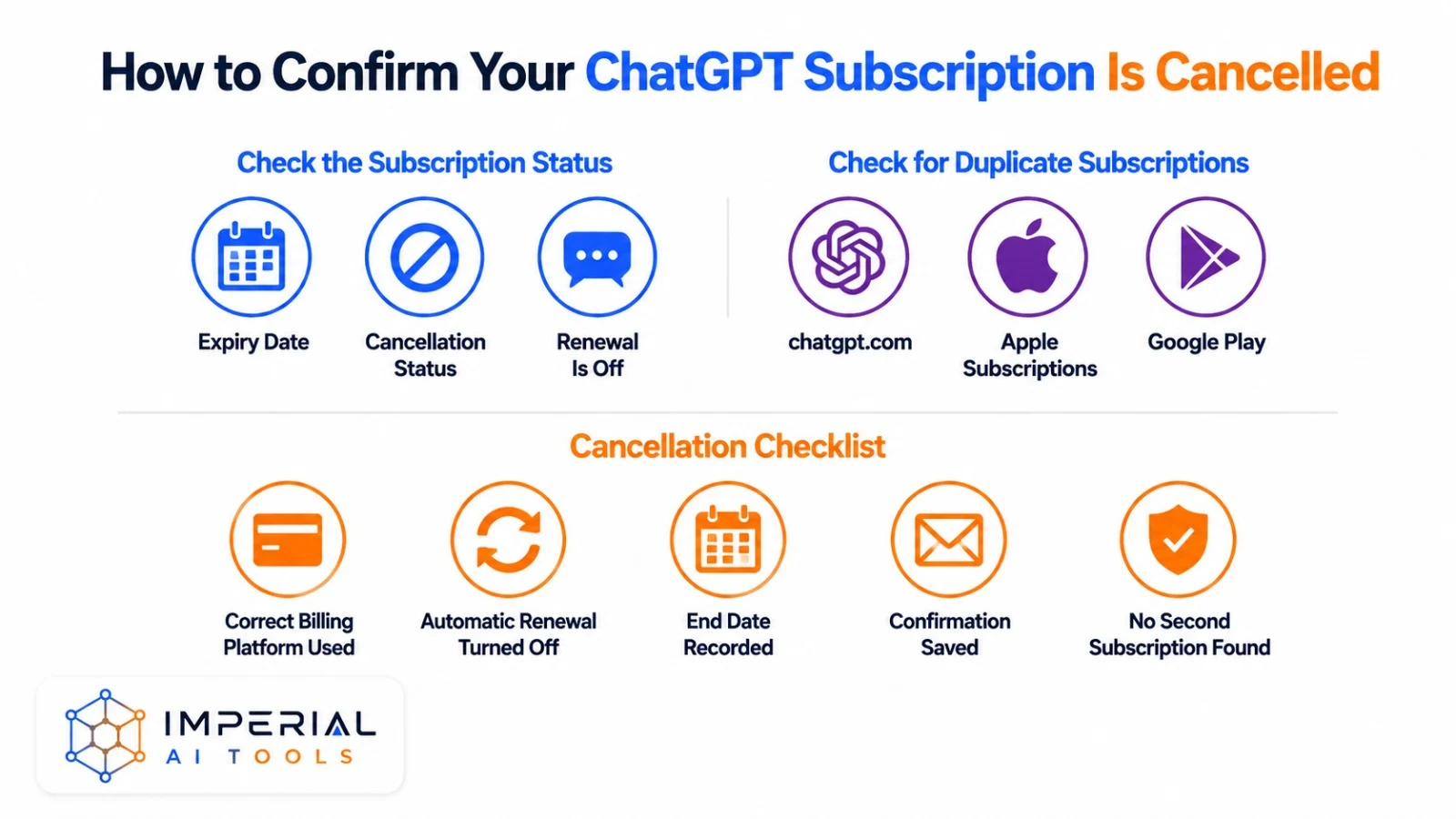
Reopen the same platform that took the original payment. Look for an expiry date, a cancellation status, or a direct message saying renewal is off. Write down the final day of paid access, and keep the cancellation email until that date has passed.
Check for duplicate subscriptions
Review chatgpt.com, Apple Subscriptions and Google Play separately if you have ever seen more than one charge. Cancelling one of them does not cancel a second subscription bought somewhere else. Check every email, Apple and Google account you own, then check your bank statement for anything you missed. Before doing anything else, check whether you hold two active subscriptions one through OpenAI and one through Apple or Google by accident. This is more common than it sounds.
Cancellation checklist
- Correct billing platform used.
- Automatic renewal turned off.
- End date recorded.
- Confirmation saved.
- No second subscription found.
What Happens After Cancelling ChatGPT?
Paid access normally continues
Paid features usually stay available until your current billing period ends. After that date, the account drops to the Free plan unless you delete it separately. Free-plan limits change from time to time, so check the current allowance on your account rather than an old number from another article. After downgrading to Free, GPT-4o access becomes limited and features like memory, Projects, and file uploads may stop working or become restricted.
Chats and account data
Cancelling a subscription is not the same as deleting an account. Your saved chats normally stay attached to the account until you delete them yourself. Some paid-only features stop working once you drop to Free. If you rely on Projects, tasks, prompts or stored files, review what your new plan still allows before you cancel.
Cancellation versus account deletion
| Action | Stops renewal | Deletes account | Deletes chats | Reversible |
|---|---|---|---|---|
| Cancel paid plan | Yes | No | No | Usually |
| Uninstall the app | No | No | No | Yes |
| Delete the account | Depends on billing platform | Yes | Scheduled for deletion | No |
How to Request a ChatGPT Refund
Cancellation Doesn’t Automatically Create a Refund
Stopping the next renewal and getting money back are two separate requests. Not everyone qualifies for a refund, so check the rules for your billing platform and your region before you assume one is coming. Contact OpenAI Support at help.openai.com while signed into the account that was charged. OpenAI does not publish a fixed refund window. Eligibility depends on your billing region, whether it’s your first purchase, and whether you cancelled before or after the renewal charged. UK and EU users may have stronger consumer rights under local law if in doubt, contact support and cite your region.
Web and Google Play purchases
OpenAI currently directs eligible users to OpenAI Support while signed into the account that was charged. Processing times change, so confirm the current wait before you tell anyone a fixed number. This section covers how to cancel a ChatGPT subscription and get a refund for anyone billed directly by OpenAI.
Apple purchases
Apple-billed users go through Apple’s own refund process, since OpenAI does not control Apple transactions directly. Submit Apple refund requests at reportaproblem.apple.com OpenAI cannot process Apple transactions directly.
Regional eligibility
Refund eligibility can shift by location and by the circumstances of the purchase. Check the current official policy for your country before you rely on a specific withdrawal period or deadline, since these are not the same everywhere. If billing policy is a deciding factor for you, our perplexity guide and claude features overview break down what each competing plan actually includes.
Troubleshooting Common Cancellation Problems
“I can’t cancel my ChatGPT subscription”
Check whether you are on the wrong billing platform first. Confirm you are signed into the correct account with the correct login method. Search your original receipt to see which company actually processed the payment.
“Something went wrong while cancelling your subscription”
Sign out and back into the correct account, then try again. If it is a direct web plan, test another browser or a private window. Check whether a browser extension is blocking the billing page. Contact official support if the error keeps happening.
The cancel button is missing
Check Apple Subscriptions and Google Play as well as the website. An expiry date with no cancel option usually means cancellation already happened. Confirm whether the account is Free, personal paid, or Business, since each shows a different screen. Readers searching how to cancel chatgpt subscription often start on the wrong billing account, so treat this as your first diagnostic step every time.
You were charged after cancelling
Compare your cancellation date against the renewal date. Cancelling less than 24 hours before renewal can still trigger one more charge. Check for a duplicate subscription under a different account or platform before you dispute anything. Keep your payment records ready before contacting support.
You can’t access the original account
Directly billed users can ask OpenAI Support to locate the subscription. Support may ask for the email on the account, the last four digits of the payment card, and the date of the most recent payment. Never post or send a full card number in a public message or chat.
Should You Downgrade, Use Free ChatGPT or Switch?
Downgrade instead of cancelling
Check your account to see if a cheaper plan is available before you cancel outright. Not all plans are available in every country check your account’s plan page to see what’s offered in your region. This is how to downgrade a ChatGPT subscription without losing access entirely, and it is also how to change a ChatGPT subscription tier without starting from zero.
Move to the Free plan
Casual users often find the Free plan is enough. Compare your actual weekly usage against what the paid plan gives you before deciding, rather than assuming you need every feature you are currently paying for. If you switch, see how to use claude for free as free-tier options worth
Consider another AI tool
If you’re leaving ChatGPT for cost reasons, check whether Claude or Gemini’s free tiers cover your actual usage before paying for anything new. If the paid plan no longer suits your work or budget, compare chatgpt against claude in 2026 before choosing your next tool. Ask yourself “should I cancel my ChatGPT subscription?” only after you know what a cheaper plan or a free tier actually covers.
Imperial AI Tools Take
Once you know how to cancel ChatGPT subscription, the fastest path is simple: open the platform that charged you, chatgpt.com, Apple or Google Play, and cancel there directly. Beginners should start by checking their receipt email, since that single step avoids most of the confusion in this guide. Our one honest caveat: refunds are never guaranteed, and OpenAI treats cancellation and refund requests as two completely separate processes. If you’re cancelling because you find ChatGPT too expensive for what you use it for, the Free plan handles casual queries well. The paid tier is only worth keeping if you hit the GPT-4o message cap regularly. Check your usage in Settings > Usage before you cancel you might find you haven’t hit the limit in weeks.
Frequently Asked Questions
Does cancelling ChatGPT also cancel OpenAI API billing?
No. ChatGPT subscription plans and OpenAI API usage run on separate billing systems. Cancelling your ChatGPT plan does not stop API charges. API users should review their usage-based billing separately inside the OpenAI Platform dashboard.
Can I transfer my ChatGPT subscription to another account?
No. OpenAI does not currently support transferring an active subscription to a different account. Unused paid time on the old account does not carry over. If you need the plan on a new account, you must subscribe again there separately.
Can I pause my ChatGPT subscription instead of cancelling it?
No pause option currently exists across OpenAI, Apple or Google Play billing for ChatGPT. Turning off renewal is the closest option. You keep access until the period ends, then you can subscribe again later whenever you want.
Can I remove my payment method after cancelling?
Removing a card and stopping renewal are separate actions. You can usually remove a saved payment method after cancelling, but any outstanding charge may still need to clear first. Platform-specific restrictions can apply, so check your billing screen.
Can I download old invoices after my subscription ends?
Yes, in most cases. ChatGPT web receipts stay in your billing history on chatgpt.com. Apple and Google Play purchases keep their own receipts inside Apple Subscriptions or Google Play’s purchase history, separate from your OpenAI account.
What happens to Projects, saved memory and scheduled tasks on the Free plan?
Feature access on the Free plan changes over time, so check your account’s current permissions after downgrading. Some paid-only features become restricted or stop running, while your existing saved chats and data generally remain in place.