The keyword appears in the first sentence, it answers intent immediately (no fluff warm-up), and it sets up the genuine differentiator (three billing channels) in the first 60 words. This beats every competitor’s opener Postclic and FluxNote both open with generic “want to cancel?” framing. Only weakness: “It sounds simple, and on the web it takes about two minutes” buries the two-minute claim mid-sentence instead of leading with it, and the awkward phrase “how to cancel HeyGen subscription billing” reads like a keyword insertion, not a sentence a person would say.
Quick Answer
To cancel your HeyGen subscription:
1. Sign in and open Settings.
2. Go to Plan and Billing.
3. Click the arrow next to Upgrade, then select Cancel Plan.
4. Confirm on every screen until you see an expiry date.
Your paid access stays live until the billing cycle ends, and the plan will not renew after that date.
What Is HeyGen? (Quick Context Before You Cancel)

HeyGen is an AI video generation platform. It lets you create presenter-led videos without a camera, an actor, or a studio. You type a script, pick a digital presenter, and the platform renders a talking video.
The main functions include:
- AI avatar videos and text to video generation.
- For talking-head animation from a single image, see our hedra ai review.
- Custom digital twins built from your own footage.
- Image to video creation and AI lip sync.
- Voice cloning and multilingual voiceovers.
- Video translation into many languages.
- Training, marketing, and sales video production.
Typical users are content creators, marketing teams, educators, sales professionals, small businesses, and international organizations that publish in several languages.
What to Do Before Cancel HeyGen Subscription
Do this checklist first. Most surprise charges come from skipping it.
- Confirm which account email holds the paid plan.
- Check the next renewal date on the billing page.
- Note whether you pay monthly or annually.
- Review how many credits are left.
- Finish any video that is still generating.
- Download every completed video you care about.
- Export your scripts and project notes.
- Save details of custom voices and avatars.
- Download invoices and receipts for your records.
- Check active add-ons and extra seats.
- Review any API usage on the account.
- Identify whether HeyGen, Apple, or Google processed the payment.
- Screenshot the current plan page before you change anything.
Common mistake: assuming one click stops everything. Cancelling the main plan does not automatically stop an App Store purchase, a separately billed add-on, or leftover API credit purchases. Each one is handled in its own place.
How to Cancel HeyGen Subscription on Desktop

This is the route most paying users need. Follow the steps in order and do not close the tab early.
1. Sign In to the Correct Account
Many people hold two logins, one Google and one email. Open the payment receipt in your inbox and check which address it names. Sign in with that one.
2. Open Account Settings
Click your profile name in the lower left corner of the home screen, then choose Settings.
3. Select Plan and Billing
Find Plan and Billing in the left side menu. Review your current plan, renewal date, billing interval, active credits, and any add-ons before you continue. This screen also links to Manage Billing, where Stripe handles your card and invoice history.
4. Open the Plan Menu
Look to the far right of the plan row. There is a small down arrow next to the Upgrade button. Click it.
5. Select Cancel Plan
Choose Cancel Plan. Do not choose Pause Plan unless you only want a short break, because pausing keeps the subscription alive.
6. Complete the Cancellation Survey
HeyGen asks why you are leaving and may offer a different plan or a discount. Answer the questions and keep going.
7. Continue Cancelling
Click Continue Cancelling on every prompt. There is more than one screen. Closing the tab halfway leaves the plan active.
8. Verify the End Date
Return to Plan and Billing. It should now show an expiry date rather than a future renewal date. That is your proof the cancellation registered.
9. Save Proof
Keep the confirmation email, a screenshot of the cancelled status, the expiry date, and your latest invoice. You will need these if a charge appears later.
Pro tip: cancel two or three days before the renewal date, not on the day. Card processing and time zones can push a renewal through while you are still clicking confirmation screens.
How to Cancel HeyGen Subscription on iPhone or Android

If you subscribed inside the iPhone or Android app, the charge belongs to Apple or Google. HeyGen cannot cancel it for you, and the web billing page may not even show the plan.
Apple App Store
- Open the Settings app on your iPhone or iPad.
- Tap your Apple ID name at the top.
- Tap Subscriptions.
- Select HeyGen from the list.
- Tap Cancel Subscription and confirm.
Google Play Store
- Open the Google Play Store app.
- Confirm you are signed in with the buying account.
- Tap your profile icon, then Payments and subscriptions.
- Tap Subscriptions and select HeyGen.
- Tap Cancel subscription and follow the prompts.
How to Cancel a HeyGen API Subscription
API billing is separate from your video plan. Cancelling one does not touch the other. Two situations exist in 2026. HeyGen has moved API access to a pay as you go credit model, so new users buy credits instead of holding a monthly API plan. Older API Pro and API Scale subscribers may still hold a recurring plan.
If you still have a recurring API plan, cancel it like this:
- Sign in to HeyGen.
- Click your name in the lower left corner.
- Select Settings.
- Choose the API option in the menu.
- Open the HeyGen API tab under Subscriptions.
- Click the arrow beside the Upgrade button.
- Select Cancel Plan.
- Complete the confirmation.
- Verify the API end date.
Before you cancel, review recent usage, any overage charges, and live integrations that call the API. Anything still pointing at your key will start failing the moment access ends.
Canceling vs Pausing HeyGen
| Option | Billing outcome | Access | Best for |
|---|---|---|---|
| Cancel | Future renewals stop | Paid access continues until expiry | Leaving indefinitely |
| Pause | Next payment delayed about 30 days | Paid features become unavailable | Very short breaks |
| Downgrade | Lower recurring cost | Smaller limits apply | Occasional continued use |
| Free plan | No paid renewal | Limited tools remain | Basic testing |
What Happens After You Cancel: Access, Videos, Credits, Refunds
Paid Access Continues Temporarily
Cancellation takes effect at the end of the current billing cycle. You keep your paid features until that date, so there is no reason to stop working immediately.
Automatic Renewal Stops
Check that the billing page shows an expiry date instead of a next renewal date. If it still shows a renewal, the cancellation did not go through.
Videos and Projects
HeyGen states that cancelling or pausing does not delete your content. Even so, download your important videos and scripts before access ends. Custom avatars beyond the free plan limit become inaccessible while your account sits on Free.
Remaining Credits
Do not expect a payout for unused credits. HeyGen confirms that unused credits do not roll over when you move to the Free plan. Use them before the cycle ends.
Refund Policy
HeyGen’s refund policy says payments are generally non-refundable, except in specific cases required by law. The company reviews requests at its own discretion. Read the official HeyGen refund policy before you submit anything. HeyGen processes web payments through Stripe if you suspect fraud, contact Stripe directly as well as your bank. Refund requests are generally reviewed within 15 days of the original charge for web/HeyGen-billed purchases; Apple and Google Play refunds follow their own 14-day and separate windows.
Why a Charge Might Appear After Cancellation
- The cancellation flow was never completed.
- The renewal had already processed before you clicked.
- The plan was paused instead of cancelled.
- A second HeyGen account is still subscribed.
- An API plan or credit purchase remains active.
- An App Store or Google Play subscription is still running.
- A business plan add-on or extra seat renews on its own schedule.
Troubleshooting HeyGen Cancellation Problems
| Problem | Likely reason | What to do |
|---|---|---|
| Cancel button is missing | Signed into the wrong account | Check the email on your payment receipt |
| Subscription is not listed | Purchased through Apple or Google | Cancel in Apple or Google Play subscriptions |
| Account still looks active | Billing period has not ended | Confirm the expiry date on Plan and Billing |
| Another payment appeared | Renewal processed before cancellation | Contact HeyGen billing support with proof |
| API charges continue | API plan is still active | Cancel inside Settings, then API |
| Team plan cannot be cancelled | You lack billing permission | Ask the workspace owner or admin |
| No confirmation email arrived | Cancellation may be incomplete | Recheck Plan and Billing status |
| Account email is unavailable | Ownership cannot be verified | Contact HeyGen support with invoice details |
Before contacting support, gather your account email, invoice number, charge date, amount charged, the last four digits of the card, a cancellation screenshot, and the current subscription status. A complete message gets resolved faster than three vague ones.
HeyGen Pricing Plans Before You Cancel
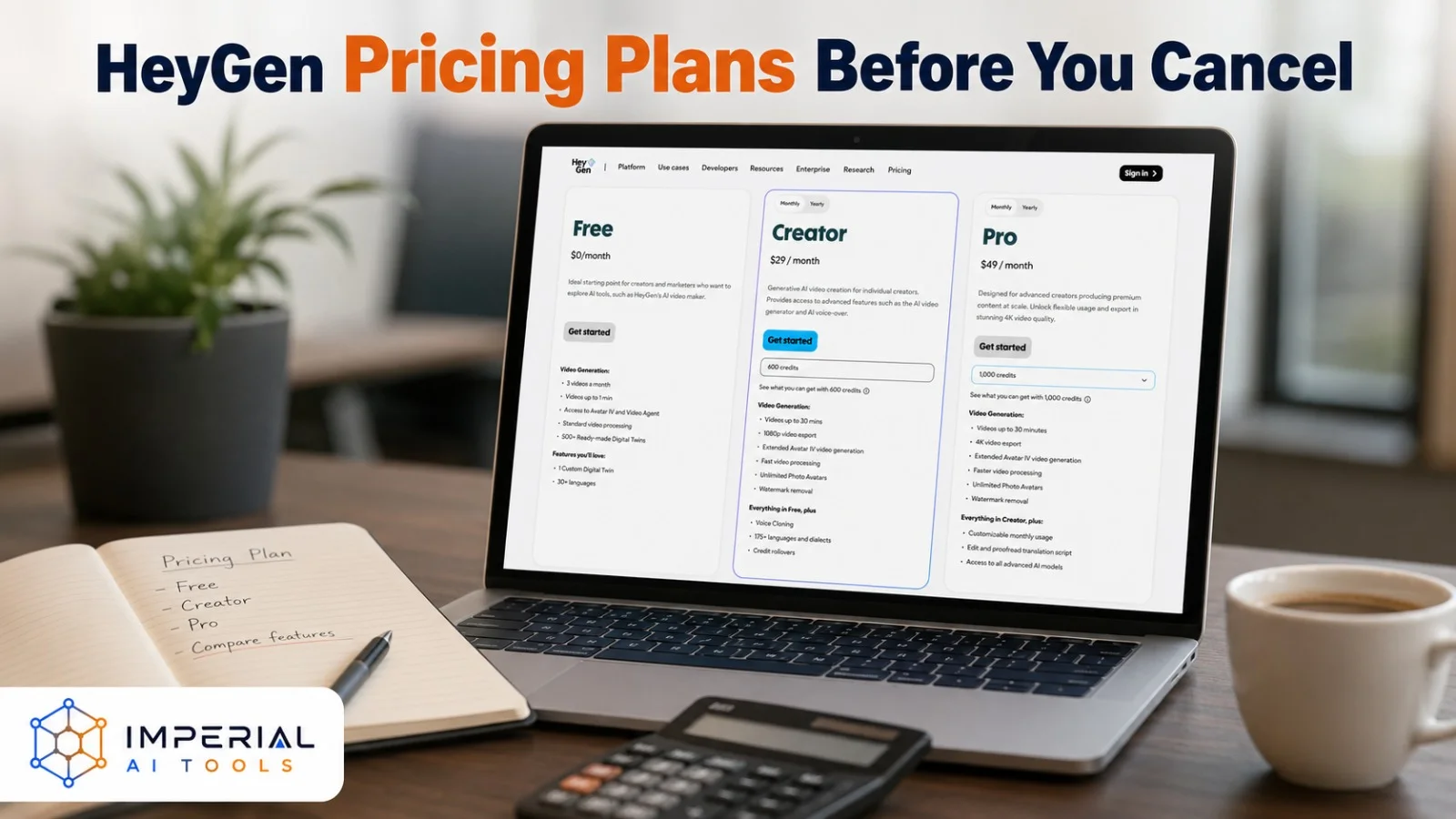
Check what you actually pay before you leave. A downgrade may be cheaper than a full exit.
| Plan | Listed monthly price | Main allowance |
|---|---|---|
| Free | $0 | About 3 videos per month, watermarked |
| Creator | $29 (about $24 billed annually) | 600 credits, 1080p exports, 1 seat |
| Pro | From $49, tiered upward | From 1,000 credits, 4K exports |
| Business | $149 plus about $20 per extra seat | Shared credit pool, collaboration, admin controls |
| Enterprise | Contact sales | Custom limits, SSO, dedicated support |
Watch these cost drivers when you compare:
- Monthly versus annual billing, since annual locks you in for a year.
- Credit burn rate, because premium avatars consume credits fast.
- Video length limits and watermark removal.
- Team seat charges that do not add credits.
- Add-ons and separate API credit purchases.
Best Alternatives to Use After Canceling
Cancelling HeyGen does not mean giving up AI video. Before switching platforms, compare heygen vs fliki to see whether an avatar-led or narrated-video workflow suits you better. The right replacement depends on whether you need avatar presentations, ad style content, translation, voice generation, or plain editing.
| What you need | Suggested tool | Honest limitation |
|---|---|---|
| AI presenter videos | Synthesia | Similar entry price, so savings are small |
| Training presentations | Colossyan | Narrower feature set outside learning content |
| Ad style creator videos | Creatify AI | Built for ads, weak for long form. Weighing ad-focused tools? Compare creatify vs arcads. |
| Face and avatar workflows | AKOOL | Output quality varies by source footage |
| General video editing | VEED | Not an avatar generator |
| Voice cloning | ElevenLabs | Audio only, no video |
| Image to video | Kling AI or Seedance | Short clips, less script control |
You just cancelled a tool you were paying for, so the next choice matters more than the last one. Start with our roundup of the best HeyGen alternatives, which ranks each option by what it actually does well. If you want a straight swap for avatar videos, the Synthesia vs HeyGen comparison shows where the pricing really differs. Teams that want more control over motion and camera can read our runway ai review before choosing. Read our higgsfield ai review if you want a more cinematic option.
Imperial AI Tools Take
Learning how to cancel HeyGen subscription billing is simple. Making sure nothing else keeps charging you is the part people get wrong. The fastest safe path is this: download your work, spend leftover credits, cancel through Settings and Plan and Billing, then confirm the page shows an expiry date. If you bought on a phone, do it in the App Store or Google Play instead. Our honest caveat is about pausing. It looks like a gentle middle option, but it strips your access while keeping the meter running roughly 30 days later. If you are unsure whether you will return, cancel and resubscribe later. Your content stays on the account. For quick image-to-video clips, see our hailuo ai review.
Frequently Asked Questions
Does deleting a HeyGen account automatically cancel billing?
No. Account deletion and subscription cancellation are separate actions. Cancel recurring billing first, save the confirmation email and a screenshot, and only then delete the account. Deleting first can leave an active subscription that keeps charging your card with no easy way to prove ownership.Add image
Can I remove my payment card after canceling HeyGen?
It depends where you bought the plan. Web subscribers manage cards through the billing portal linked in Plan and Billing. App Store and Google Play purchases are controlled by Apple or Google. If the card will not delete, contact HeyGen support or the payment platform used.
Can a team member cancel a HeyGen Business subscription?
Generally no. Cancellation requires workspace owner or billing administrator access. Regular members will not see the Cancel Plan control at all. If you need the plan stopped, contact the account owner or your finance administrator and ask them to run the cancellation and share proof.
Are unused HeyGen credits transferable to another account?
Do not count on it. HeyGen confirms that unused credits do not roll over when a paid plan ends and the account moves to Free. Spend remaining credits before your billing period closes, or check current credit terms with HeyGen support first.
Does canceling HeyGen also log me out of the account?
No, it doesn’t. Cancelling only stops future billing it has nothing to do with your login session. You stay signed in and keep normal account access on the Free plan afterward. You’ll only get logged out if you sign out yourself or delete the account entirely, which is a separate action.
What are HeyGen’s accepted payment methods, and does that affect cancellation?
HeyGen accepts major credit and debit cards through Stripe, plus Apple and Google Pay when you subscribe through their app stores. Your payment method decides where you cancel: web and card subscribers cancel inside HeyGen’s own billing settings, while App Store or Google Play subscribers must cancel through Apple or Google instead.
Can I Cancel Anytime?
Yes. HeyGen monthly plans have no lock-in period cancel whenever you want and access continues until the billing cycle ends. Annual plans can also be cancelled anytime, but the annual discount doesn’t refund back to the monthly rate for time already used.