Lovable AI is a prompt-based platform that builds and publishes full-stack web apps from plain English. This Lovable AI guide shows you how to use Lovable step by step: write a prompt, review the build, add a backend, sync to GitHub, publish, connect a custom domain, and run security checks. It works best for MVPs, internal tools, prototypes and simple SaaS apps. Lovable speeds up the build, but you still must test every app before real users touch it. We checked every fact against Lovable’s docs, changelog and terms on October 23, 2026.
Quick Answer
Lovable AI is a prompt-based platform for building and publishing full-stack web apps. It is best suited to websites, MVPs, internal tools, prototypes, and simple SaaS products. You describe the app, review what it builds, make small changes, test it, then publish.
What Is Lovable AI?

Lovable describes itself as a full-stack AI development platform. You build, change, and deploy web applications by chatting with it. You start with a prompt, then refine the project with follow-up messages, screenshots, visual edits, backend features, and code sync.
The project chat has three modes:
- Chat mode: talk about your app and ideas without changing any code.
- Plan mode: investigate a problem and write a plan you can edit and approve. It never changes your code.
- Build mode: makes the changes and checks the result. This mode was called Agent mode before.
It differs from classic drag-and-drop builders like Framer AI because Lovable focuses on generating working web applications with editable code, not only visually designed pages.
- It is an AI app and website builder, not just a design tool.
- It generates both the interface and the application logic.
- It supports full-stack features, including a database and sign-in.
- It works for non-technical founders and for developers who want to edit the code.
Is Lovable a no-code tool? It is closer to low-code with an AI layer. You can start without writing code, and developers can open the code editor (paid plans) or sync the project to Git and edit directly.
Lovable AI Quick Facts
| Item | Detail |
|---|---|
| Tool type | AI full-stack web app builder (see more ai code assistants) |
| Main input | Prompts, screenshots, and design references, including Figma designs |
| Main output | Responsive websites and web applications |
| Chat modes | Chat, Plan, and Build |
| Backend options | Lovable’s built-in backend (Lovable Cloud) or your own Supabase project |
| Code sync | GitHub, GitLab, and Bitbucket Cloud on all plans. Code editing and downloading need a paid plan. |
| Publishing | A lovable.app address, or your own domain on paid plans |
| Pricing | Credit-based, with a free plan. |
| Best for | MVPs, SaaS prototypes, internal tools, and websites |
| Native mobile apps | Not generated. Use a PWA or wrap the published app with Capacitor. |
Who Should Use Lovable AI?
Lovable is a good fit for
- Founders validating an app idea before hiring a development team.
- Freelancers and agencies building fast client prototypes.
- Marketers creating campaign landing pages or interactive tools.
- Product managers testing workflows before handing them to engineering.
- Small teams building internal dashboards.
- Developers who want to speed up front-end and boilerplate work.
- Students learning how apps are structured.
Lovable may not be the right choice for
- Regulated apps built without technical oversight.
- Complex enterprise systems that need custom infrastructure.
- Teams that need native iOS or Android apps right away.
- People who cannot review or test what gets generated.
- Projects with a very specialized backend design.
- Anyone expecting every prompt to give production-ready output.
Short version: Lovable is strongest when speed and experimenting matter. It is weaker when a project needs deep infrastructure control.
Lovable AI Limits to Know Before You Start

- Credit use is hard to predict. Debugging and big prompts can cost more than you expect. See the credits section below for ways to control it.
- Big, vague prompts give uneven results. Ask for one change at a time.
- Generated code still needs testing and review. Security is not fully automatic.
- Published apps are public by default. Free and Pro plans can switch a project to invite-only (up to 10 people per project). Publishing to your whole workspace or to groups needs a Business or Enterprise plan.
How to Use Lovable AI: The 8-Step Workflow
Go to lovable.dev and sign up with Google, GitHub or email. The Free plan includes 5 build credits per day, so you can try the workflow at no cost. Your workspace holds your projects and credit balance.
Step 1: Define Your App Before Building
Before you type a prompt, write down:
- Who the users are
- The core problem the app solves
- Which pages you actually need
- The main action a user should take
- What data the app must store or show
- Any integrations you will rely on
- The visual direction
Skipping this step is the most common reason people burn credits and redo work.
Step 2: Create a New Lovable Project
From the dashboard, start a blank project or remix a template from the templates page, then enter your first prompt. If you already have a design, you can bring it in with the Lovable plugin for Figma or by attaching a .fig file in the chat. For anything with several moving parts, use Plan mode first so Lovable outlines an approach before it touches code.
Step 3: Write a Detailed First Prompt
A reusable structure:
Build a [type of app] for [target audience]. Include [pages], [features], [data requirements], [design direction], and [technical requirements]. Do not change [constraints].
The more specific you are about constraints, the less cleanup you do later.
Step 4: Generate and Review the First Version
Check these before you ask for anything else:
- Page structure and navigation
- Mobile layout
- Whether buttons, links, and forms really work
- Placeholder text that still needs replacing
- The full user journey from start to finish
Step 5: Edit With Chat and Visual Controls
You can select an element in the preview and change its text, color, layout, or spacing. You can also attach screenshots to show exactly what should change. Ask for one focused change at a time. If a change goes wrong, revert from version history instead of stacking fixes on top of it.
If you want to try an idea without touching the main version, use a draft. A draft is a separate copy of the project with its own chat and preview. You can accept it into the project or delete it. Accepting a draft does not publish anything.
Step 6: Add a Backend and Sign-In
See the next section on choosing between Lovable’s built-in backend and your own Supabase project.
Step 7: Connect Git and Review the Code
Link your project to GitHub, GitLab or Bitbucket for a backup you own. Do your own edits on a feature branch, never on the synced branch. Read what Lovable wrote for sign-in, database rules and any keys. Pushing to Git does not publish your app. You must still click Publish.
Step 8: Test, Scan, and Publish
- Create a test account and check what each user role can see.
- Test every form and database action.
- Run the security scans (details below).
- Review the mobile layout again.
- Publish, then publish again after every later edit.
Publishing deploys a snapshot. Edits you make afterwards stay off the live site until you click Publish changes. This is the most common point of confusion for new users.
Lovable AI Features Explained
| Feature | What it does | Benefit | Watch out for |
|---|---|---|---|
| Natural-language generation | Creates apps from written instructions | Faster prototyping | Output depends on prompt quality |
| Visual editing | Edits selected interface elements | Easier design refinement | Complex changes may still need a prompt |
| Image and screenshot input | Uses references for layout direction | Better visual matching | Results are not always pixel-perfect |
| Drafts | Lets you try changes in a separate copy | Safe experiments | Drafts share your project’s data, so test data is real data |
| Built-in backend (Lovable Cloud) | Gives you a database, sign-in, storage, and server code | Easiest backend setup | Usage uses credits |
| Supabase connection | Uses your own Supabase project as the backend | Direct control and your own billing | Row-level security must be set up carefully |
| Git sync | Keeps a repository in sync with your project | Backup and collaboration | Code review is still your job |
| Publishing | Deploys the web app | Fast sharing and launching | Access controls depend on your plan |
| AI features for your app | Adds chatbots, summaries, search, image, and voice features | Faster AI-product creation | Each model call uses credits |
You can use these AI features to build apps with chatbots, document Q&A, translation, image generation, semantic search, and voice. Model availability changes often, so ask Lovable what is currently supported before you design around one model.
Lovable Cloud vs Supabase: Which Backend Should You Choose?
Most projects do not need a separate Supabase account. Lovable’s built-in backend (Lovable Cloud) is on by default and gives you a database, sign-in, file storage, and server functions with no extra setup. It is billed through your Lovable credits.
Connect your own Supabase project when you want to own the backend yourself: your own Supabase account and billing, full access to the Supabase dashboard, or an existing project you already use.
| Topic | Built-in backend (Cloud) | Your own Supabase project |
|---|---|---|
| Setup | Automatic | Needs a Supabase account and project |
| Billing | Lovable credits | Your Supabase plan |
| Where you manage it | Inside Lovable | The Supabase dashboard |
| Switching later | There is no one-click move in either direction. Decide early. | |
To take payments, ask Lovable in Plan mode how to add Stripe to your app. Start in test mode. Never paste a secret key into the chat. Use Lovable’s secret input.
How to connect Supabase
- A workspace owner or admin links a Supabase organization to the Lovable workspace once.
- In the project, open Settings → General → External Supabase and click Connect.
- Pick a Supabase project from your linked organizations.
- Check More → Supabase to confirm the connection.
Lovable warns you if another Lovable project already uses the same Supabase project. Projects that share one Supabase project overwrite each other’s secrets, so share one only on purpose.
When Lovable changes your database structure on Supabase, it shows the change and asks for approval first, then saves the migration file in your code.
Tip: After you change code outside Lovable, tell Lovable in the chat what you changed and what must stay as it is. Its next edit then builds on your work.
How to Publish a Lovable App and Connect a Custom Domain
Publish in two clicks
- Click Publish at the top right of the editor.
- Check the suggested
lovable.appaddress, who can see the site, and the security-scan result, then click Publish again.
To push later changes, open the same dialog and click Publish changes. You can also ask Lovable in the chat to publish. Publishing from the dialog is free. Asking in the chat counts as normal build usage.
Lovable generates the site title, description, and icon while it builds. To change them, or the social-sharing image, ask in the chat. Each page has its own values.
Connect a custom domain
Custom domains need a paid plan. You can buy a domain through Lovable or connect one you already own.
- Publish the project first. The domain does not serve anything until you do.
- Open Project → Settings → Domains and choose Connect existing domain.
- Enter your domain or subdomain and choose root domain or subdomain.
- Add the records Lovable shows you at your DNS provider (an
Arecord and a verificationTXTrecord). Copy them exactly. Automatic setup is also offered for many providers. - Wait for the status to change to Live. DNS changes can take up to 72 hours, though most finish within a few hours.
Common domain problems
- Old site still shows: remove leftover
A,AAAA, orCNAMErecords from your old host. AnAAAArecord can break the setup. - Stuck on Verifying: if your DNS is on Cloudflare, set the Lovable records to DNS only (not proxied) while verification runs.
- Certificate fails: if you have
CAArecords, they must allow the certificate authorities Lovable uses. The Lovable docs list them. - Sign-in fails on the new domain: add the domain to your app’s sign-in redirect URLs. Lovable does this automatically on its built-in backend. With your own Supabase project, do it in Supabase.
- Redirects: only one domain can be primary. Other domains redirect to it with a temporary (302) redirect, not a permanent one.
Do not build a business on the free lovable.app address. Lovable’s terms say it owns that domain and can reclaim or reassign subdomains, usually with 7 days’ notice. Use a custom domain for anything that matters.
If you later want to host the exported code somewhere else, see our render alternatives and render review for hosting options. Keep in mind that Lovable’s built-in backend, AI features, and managed connectors do not move out with the code.
How to Optimize a Lovable Website for SEO and AI Search
Publishing a working site does not guarantee traffic from Google, chatgpt, perplexity, gemini, or other search tools. You still need to set up indexing, metadata, page structure, and a domain you control.
Run Lovable’s SEO and AI Search Review
Open More → Analytics and select the SEO & AI tab. The review is included on all plans. It checks your sitemap, robots.txt, page titles and descriptions, social-preview tags, structured data, heading structure, image alt text, canonical tags, and indexing.
Clicking Try to fix asks Lovable to apply the change and uses credits like any other request. Published sites get extra checks, such as live indexing and Google Search Console setup. The review does not check page speed or give a full accessibility audit. Run Google PageSpeed Insights on your published address for those.
Know how your app is rendered
- Apps created from May 13, 2026 (June 22, 2026 on Enterprise) use TanStack Start with server-side rendering. Every request returns full HTML.
- Older React + Vite apps are pre-rendered when a verified crawler asks for a page. Content that loads late may be missing. You can upgrade an older project to TanStack Start, which costs credits.
SEO checklist: before launch, check title tags, descriptions, canonical URLs, sitemap, robots.txt, structured data, mobile layout, page speed, internal links, image alt text, and your Google Search Console connection.
- Connect google search console from the Google searches card. Lovable can verify the site and submit the sitemap for you in chat. Publish your latest changes first, because Google reads the sitemap from the live site.
- Use a custom domain, set it as primary, then rerun the review so the new domain is checked.
- You do not need an
llms.txtfile, according to Lovable’s docs. - Lovable’s chat can run keyword and competitor research using Semrush data without a Semrush account. Lovable lists this as free of extra fees through November 30, 2026.
From Idea to Live App: A Checklist
- Write the prompt. Use the seven-part framework. Start in Plan mode if the app has several parts.
- Build the first version. Review pages, mobile layout, and buttons.
- Connect the backend. Choose the built-in backend or your own Supabase project.
- Test with real flows. Use two test accounts and check that each only sees their own data.
- Run the security scans. Fix critical findings first.
- Sync to Git. Create the repository and confirm the sync status.
- Publish. Check the address, audience, and metadata.
- Add your domain. Connect it, wait for Live, then rerun the SEO review.
A First-App Walkthrough: A Booking Page for a Small Studio
This example is separate from the steps above. It shows the order of work, not a guaranteed result.
- Plan first. In Plan mode, send: “I run a small yoga studio. I need a page where people book a class. List the pages, the data to store, and the risks. Do not change anything yet.” Edit the plan, then approve it.
- Build the public pages. Ask for the home page and class list only. Check them in a phone-size preview.
- Add the booking form and storage. Ask for a form that saves bookings to the database. Submit a test booking and confirm it appears.
- Add an owner login. Ask for a simple admin page that lists bookings, visible only to the owner. Test with a second account that must be blocked.
- Scan and fix. Run the security scans and fix critical findings.
- Publish. Publish to the
lovable.appaddress, share it with two friends, and fix what they find. Add a domain once it works.
Lovable AI Errors: What to Do When a Build Breaks

Something breaking is normal. Work through these steps in order:
- Click Try to fix once or twice. Your account includes 10 free fixes. Each one comes back 24 hours after you use it. Past that, a fix is a normal credit-using message.
- Describe the bug clearly. Say what is broken, where, what you expected, and what happened. Attach a screenshot or paste the exact error text, especially for errors on your published site.
- Switch to Plan mode. Stop retrying blind fixes. Ask: “What is the root cause? Show the code involved and explain before proposing a fix.”
- Revert if fixes piled up. Restore a working version from version history, or edit an earlier message and choose Revert and resend. Then tell Lovable what you reverted.
Example. The booking form stops saving after you add the admin page. Weak prompt: “Nothing works, fix it.” Better prompt, in Plan mode: “The booking form no longer saves. It worked before I added the admin page. Review the recent changes, find which one broke it, and explain before fixing.”
Lovable AI Credits: How to Manage Them
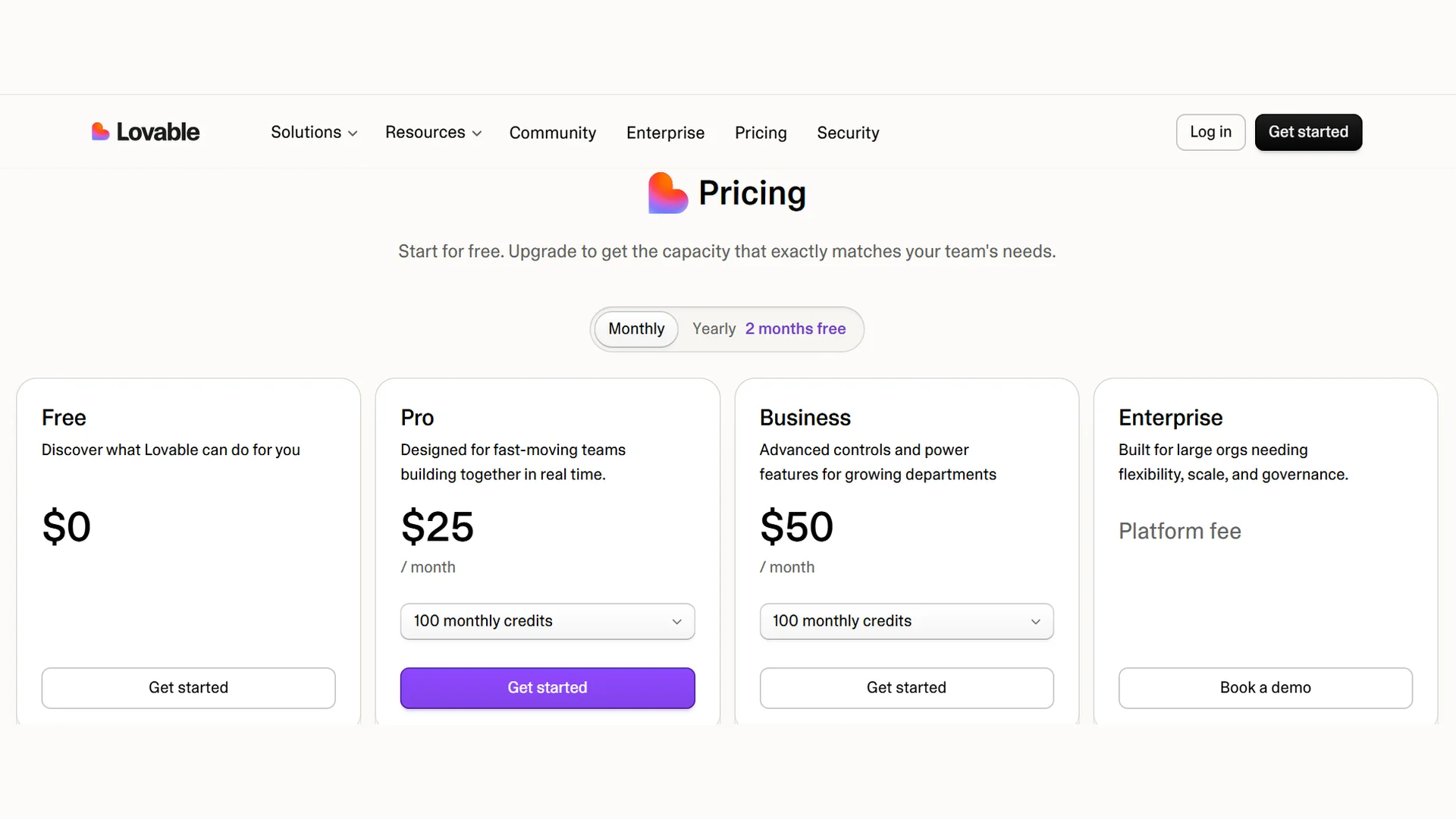
This section covers how credits behave.
What credits pay for
- Building: Plan and Build mode messages, and images and videos Lovable generates for you.
- Chatting: messages in Chat mode and Chats. These have their own pricing, with a daily allowance. Lovable states that the current chat pricing applies through October 31, 2026, so check the docs after that date.
- Running your app: hosting and the built-in backend (database, storage, server code).
- AI features inside your app: each model call your published app makes.
- Managed connectors: some connectors bill through Lovable credits.
How much things cost
- A Plan mode message costs 1 credit, plus the cost of any research Lovable runs while planning.
- A Build mode message is priced by the work done. Lovable’s own examples run from about 0.5 credits for a small style change to about 2 credits for a landing page with images. Lovable calls these illustrative, and its pricing page and docs list slightly different numbers for the landing page example, so treat them as rough.
- Open the More options menu under any reply to see its exact cost, even while it is still running.
A budget example (illustration only)
Using Lovable’s illustrative costs, a small first app might look like this:
| Task | Illustrative credits |
|---|---|
| Landing page with images | 2.00 |
| Add sign-up and login | 1.20 |
| Five small text or style tweaks (0.50 each) | 2.50 |
| Remove one section | 0.90 |
| Total | 6.60 |
Real costs vary by project. Bigger or messier requests cost more. Daily build credits (5 per day on Free, Pro, and Business) are used first, but they reset each day at 00:00 UTC and do not roll over.
How credits expire
- Daily credits expire at the end of the day.
- Monthly plan credits expire 2 months after they are issued on monthly plans, and roll over while the subscription stays active.
- Top-up credits last 12 months.
Security Checks Before You Launch
Lovable gives you two built-in scanners. Both are free.
- Basic scan: runs automatically when you open the Publish dialog (about 10 seconds). It lints row-level security policies and reviews your database setup, among other checks.
- Deep scan: optional, run from the Security view. It takes roughly 3 to 15 minutes and looks at things like exposed secrets, unsafe input handling, and authorization gaps.
Findings do not block publishing by default, but fix critical ones first. Workspace admins can switch on a setting that blocks publishing while critical findings are open.
Row-level security (RLS)
Row-level security decides which signed-in user can read or change which database rows. Missing RLS policies are a common way app data gets exposed. Before going live:
- Make sure every table has policies that limit access.
- Ask Lovable: “Make sure users can only see and edit their own data.”
- Check the policies yourself in the database view, or in Supabase if you connected your own project.
- Test with two accounts.
Secrets and keys
- Never paste secret keys into your app code or the chat as plain text. Use Lovable’s secret input so keys are stored securely.
- Variables starting with
VITE_are shipped to the browser. Never put a secret in one. - Rotate any key that you think leaked.
A scan is a safety net, not a security audit. For apps that handle money, health data, or personal data, get a technical review.
What Can You Build With Lovable AI?
Business websites: service sites, landing pages, and lead-generation pages.
- Startup MVPs: sign-in, dashboards, onboarding flows, and payments.
- Business websites: service sites, landing pages, and lead-generation pages.
- Internal tools: CRMs, admin panels, inventory trackers, and reporting dashboards. (For a dedicated internal-tool builder, see our retool review.)
- SaaS apps: subscription products and customer portals.
- AI-powered tools: chatbots, content assistants, document tools, and search interfaces.
- Client prototypes: demos and interactive concepts for approval.
Is Lovable AI Worth It?
Lovable is worth it if you want a working web prototype in days, and you will test it before launch. It is not worth it if you need native mobile apps or heavy custom infrastructure. It becomes less suitable when a project needs highly specialized infrastructure, native mobile development, or heavy custom engineering.
| Who you are | How Lovable fits |
|---|---|
| Non-technical founder | Strong option for validating ideas |
| Freelancer | Useful for prototypes and client projects |
| Developer | Useful for speeding up repetitive work |
| Enterprise team | Look at Business or Enterprise controls first |
| Native mobile developer | Not the most direct option |
| Security-sensitive organization | Add technical review and governance controls |
Conclusion
Lovable AI turns clear prompts into working web apps, with editing, backend, code sync, and publishing built in. Its biggest strengths are speed and a low barrier to entry: you can go from idea to a working prototype in one sitting.
Its main limits are credit use that is hard to predict, debugging overhead, and the ongoing need for a person to review what it generates. Plan first, change one thing at a time, test with real accounts, and run the security scans before you publish.
Lovable AI Guide FAQ
How do I use Lovable AI efficiently?
Plan first, ask for one clear change at a time, and set limits on what must not change. Use realistic content instead of placeholders, and review each result before asking for more. If something breaks, use Plan mode to find the cause instead of retrying blind fixes.
Does Lovable own the apps I build?
According to Lovable’s terms (updated August 28, 2026), you own your Customer Data, including the apps you build, and the AI output generated for you, subject to third-party rights. You also give Lovable a broad license to use your data for its business, including AI training, unless you opt out.
Is Lovable secure enough for a production app?
Lovable includes a free Basic scan that runs on publish and an optional Deep scan. It still does not replace your own review. Check row-level security on every table, keep secrets out of your code, and test with separate accounts. For apps that handle payments or personal data, get a technical review first.
What happens if I run out of Lovable credits?
Building stops, AI features in your published app stop working, and apps on the built-in backend pause. If it happens mid-task, the message pauses and you can add credits to resume or ask Lovable to wrap up. Daily credits do not roll over, and monthly plan credits expire after a set period, so check your balance before big tasks.
Is Lovable AI free?
Yes. Lovable has a free plan with 5 daily build credits. Custom domains, code editing and code downloads need a paid plan.